
Let’s be real for a second: if you spend any time in the maker space, your feeds have been absolutely flooded with hype for the new H2C 3D printer. The marketing promises the moon—zero purge towers, instant tool changes, and multi-material capabilities that make traditional IDEX machines look like relics from the stone age.
But how does it actually hold up when the cameras are off and you are just trying to print strong, functional parts in your workshop?
At Bababuilds, we don’t care much for printing multi-colored articulated dragons. We care about building functional gear – custom brackets for a heavy-duty solar inverter rack, rugged outdoor dog feeder mechanisms, or impact-resistant structural parts for a surveillance drone. When you are pushing engineering-grade filaments like PA6-GF (Glass Fiber Nylon) and need precise, dissolvable supports, the requirements change drastically. The H2C 3D Printer comes with a hefty price tag of around $2,400 USD. That is a massive investment.
In this deep dive, we are stripping away the marketing fluff to look at the actual mechanics of the H2C, focusing heavily on its dual-head architecture, the revolutionary “Vortek Hotends” induction-heated swapping system, and what “Hybrid Slicing” actually means for your workshop.
Let’s get down to brass tacks.
Table of Contents
The Architecture: Not Your Grandfather’s Toolchanger
To understand the H2C 3D Printer, you have to understand what it isn’t. It is not a traditional toolchanger like the Prusa XL, where the entire extruder and hotend assembly are picked up and put down. And it isn’t a single-nozzle AMS (Automatic Material System) setup like the Bambu Lab P1S or X1C, which has to physically push and pull different colored filaments through a single melt zone, generating massive purge towers to prevent color bleeding.
The H2C is a Dual-Head Hybrid Machine.
Here is how the gantry is actually laid out:
- The Left Head (Fixed): This is a standard, permanent hotend and extruder assembly. It functions exactly like what you are used to on a high-end coreXY machine.
- The Right Head (Active Vortek Carrier): This is where the magic happens. This carriage does not have a permanently affixed hotend. Instead, it features an electromagnetic grabber and an induction heating claw.
- The Vortek Rack: Mounted at the back of the massive 325 × 320 × 325 mm build volume is a motorized rack holding up to 6 independent “Vortek” hotend nozzles.
This hybrid approach attempts to solve the biggest problem in multi-material FDM printing: the sheer amount of time and wasted plastic required to transition between distinct materials with drastically different melting temperatures.
Deep Dive: The “Vortek Hotends” Induction System
The absolute star of the show on the H2C 3D Printer is the Vortek hotend system. If you want to know where your $2,400 went, this is it.
In traditional 3D printers, the hotend is heated by a ceramic or metal heater cartridge shoved into a heater block, with a delicate glass thermistor wired in to read the temperature. If you want to swap that hotend automatically, you need complex physical electrical contacts that mate perfectly every single time the printhead docks. Over thousands of swaps, physical contacts wear out, get covered in microscopic plastic dust, or simply fail.
Bambu engineered around this problem entirely by utilizing contactless induction heating.
If you have ever used an induction stovetop, you know the principle. The Right Head carriage features a heavy-duty copper coil claw. The swappable Vortek nozzles themselves contain no heating wires or thermistor cables. They are essentially precisely machined blocks of conductive metal with a built-in wireless RFID-style chip that tells the printer exactly what size and type of nozzle it is (e.g., 0.4mm Hardened Steel).
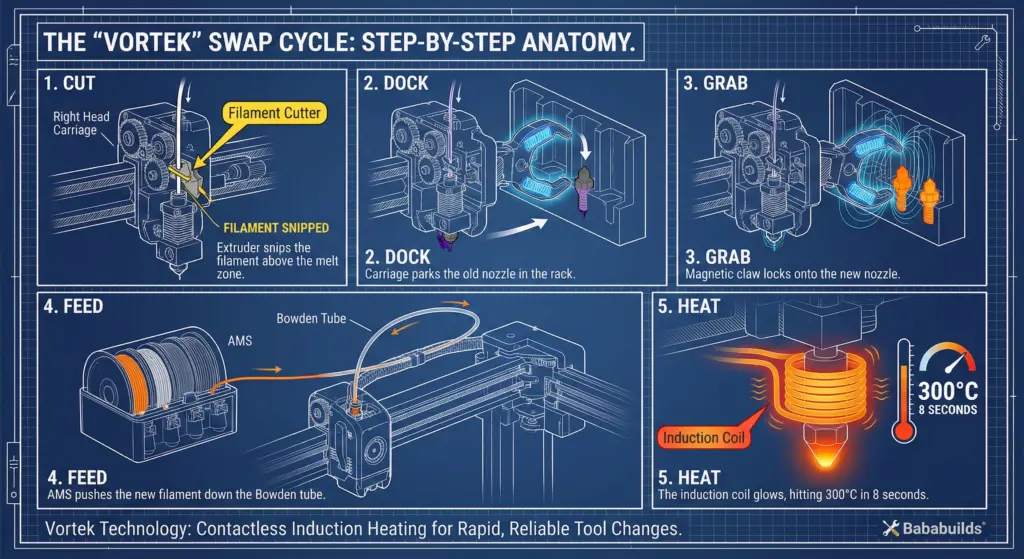
The 8-Second Vortek Hotends Swap Process
When a print calls for a material change on the right carriage, the choreography is fascinating to watch:
- The Cut: The extruder cuts the current filament precisely above the hotend.
- The Dock: The carriage moves to the rear rack and physically deposits the hotend into an empty slot.
- The Grab: The carriage shifts over and mechanically grabs the new Vortek nozzle required for the next material.
- The Feed: While the carriage moves back to the print area, the AMS rapidly feeds the new filament down the Bowden tube and into the newly attached hotend.
- The Heat: The induction claw powers up. Because induction heats the metal directly and instantly via magnetic fields—rather than waiting for heat to transfer from a ceramic block—an empty Vortek nozzle rockets from room temperature to 300°C in an astonishing 8 seconds.
Tom’s 3D reviewers and independent makers have confirmed this timing. It is violently fast. There are no delicate wires to align, no contacts to wear out, and no cross-contamination of the melt zones.
The Purge Paradigm: Waste vs. Time Penalties
You will see a lot of influencers claiming the H2C 3D Printer delivers “0 purge towers and 0 waste.” As engineers, we know there is no such thing as a free lunch. Let’s clarify the physics of what is actually happening.
The Death of the Purge Tower
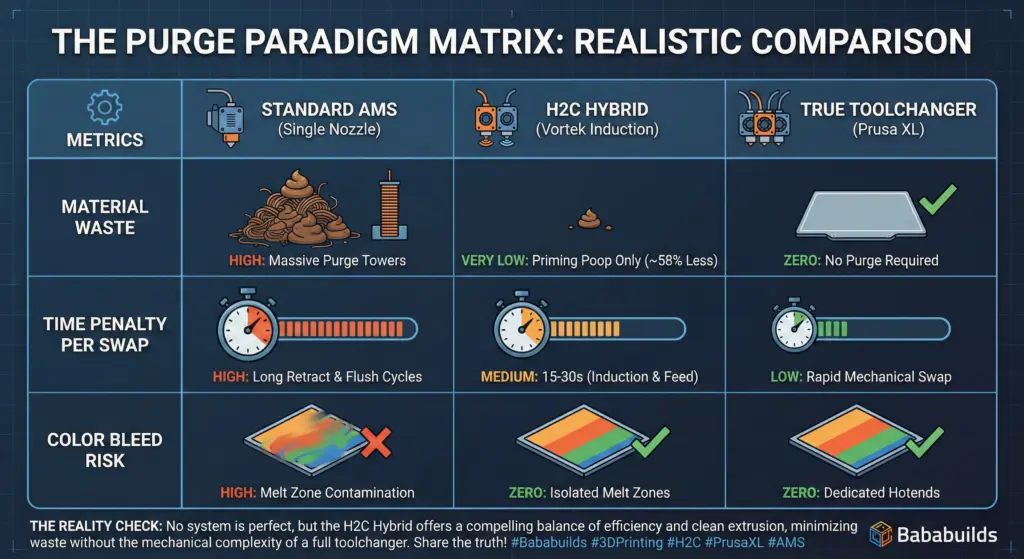
Because you are physically swapping the entire melt zone (the hotend), you completely eliminate the need for a purge tower to transition colors or materials. If you are printing a white part with black text, the black filament never touches the white hotend. Dark-to-light bleeds, which plague single-nozzle AMS systems, vanish entirely.
The Reality of the “Poop”
However, the filament is still being retracted and fed by the AMS down a long PTFE tube. When the new filament hits the newly attached, freshly heated Vortek nozzle, the internal pressure of the hotend is not stable. If the printer just started moving over your part immediately, it would underextrude for the first few millimeters.
To solve this, the H2C still has to do a small priming purge—a tiny “poop” out the back chute—to stabilize the nozzle pressure. So, is it zero waste? No. But Bambu officially claims the Vortek system reduces purge waste by up to 58% compared to traditional AMS setups. For expensive engineering filaments, that 58% translates to real money saved over the lifespan of the machine.
The Time Penalty
While the induction heating takes only 8 seconds, retracting filament back into the AMS, grabbing a new nozzle, and feeding new filament all the way down the tube takes time. Expect roughly 15 to 30 seconds of overhead per swap.
If you slice a model with 500 material swaps, an H2C run will take significantly longer than an equivalent single-nozzle job, simply because the machine is doing more physical mechanical movements. You are trading outright speed for material efficiency and absolute chemical isolation between materials. For many makers, waiting an extra hour on a 24-hour print to save half a roll of expensive support material is an absolute no-brainer.
Workflow Hacks: The Dual-Nozzle Bypass
Here is a pro-tip for when you want maximum speed and don’t need the full 6-nozzle arsenal.
If you are only using two materials—say, a rugged PETG for the main body of a project and dissolvable PVA for the supports—you can set the H2C up to mimic a standard high-speed IDEX (Independent Dual Extruder) machine.
Remember that Left Fixed Nozzle we talked about earlier? Bambu wisely designed the firmware so that if you assign your base material to the Left Nozzle and your support material to the Right Nozzle (leaving one Vortek nozzle permanently attached during the print), you skip the tool-changing rack entirely.
In this mode, switching between the two materials is effectively instant. There is no AMS retraction, no 8-second induction preheat, and no mechanical docking. The printer just physically toggles between the left and right hotends using a mechanical blocker flap to prevent oozing. This is the absolute fastest way to print complex two-material functional parts. Keep the 6-slot Vortek rack in reserve for when you truly need a massive array of materials.
“Hybrid Slicing” and Multi-Material FDM Engineering
Here is where the Bambu Labs H2C 3D Printer shifts from a cool gadget into an indispensable workshop tool.
With the release of Bambu Studio v2.5 (and subsequent forks in the OrcaSlicer community), the software has caught up to the hardware. They introduced “Hybrid Slicing.”
Currently, true mixed-diameter printing (like automatically swapping between a 0.8 mm nozzle for infill and a 0.2 mm nozzle for outer walls on the same layer) is not yet supported in the firmware—though it is the community’s holy grail.
However, what is supported right now is mixing flow rates and material properties within a single, unified print job. And for functional design, this is massive.
Real World Application: The Surveillance Drone Frame
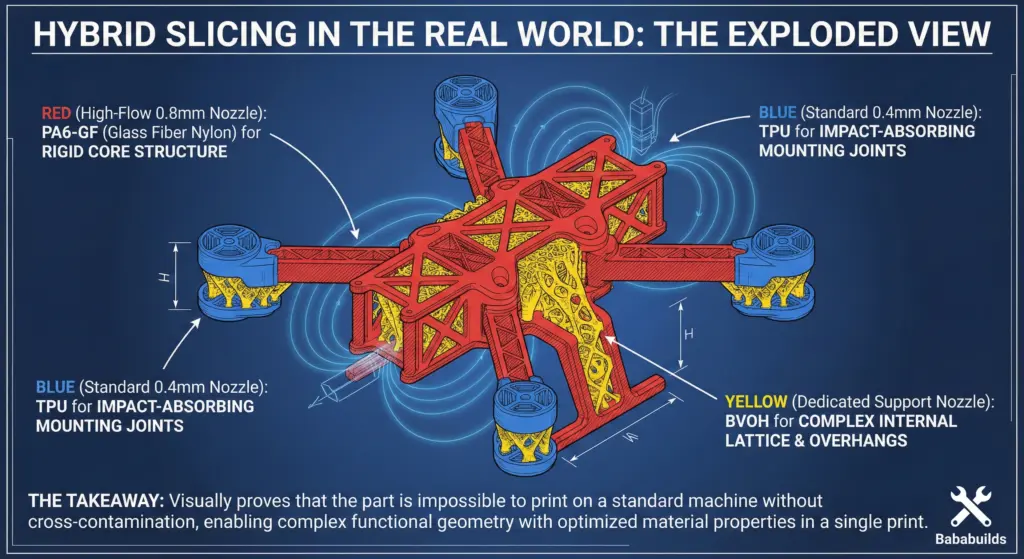
Imagine you are prototyping a custom chassis for a ruggedized surveillance drone. You need the main fuselage to be incredibly stiff and lightweight, but you need the mounting joints for the camera gimbal and battery to absorb vibrations and impact.
With the H2C and Hybrid Slicing, you can:
- Load PA-CF (Carbon Fiber Nylon) into an AMS slot assigned to a hardened-steel Vortek nozzle for the rigid drone arms.
- Load TPU (Flexible Polyurethane) into another slot assigned to a standard Vortek nozzle for the dampening joints.
- Load BVOH (High-temp dissolvable support) into a third slot assigned to its own dedicated hotend to support the complex internal cooling channels of the drone frame.
The slicer seamlessly handles the transitions. Because the Vortek system isolates the melt zones, the high-temperature PA-CF (which prints around 290°C) never cooks and degrades the lower-temperature TPU or soluble supports. The materials stay chemically pure. When the print is done, you toss the frame in warm water, the BVOH dissolves away, and you are left with a single, continuous part that has distinct rigid and flexible properties perfectly mapped to your CAD design.
Real World Application: Solar Inverter Mounting Hardware
If you are building a custom steel rack for a massive 2KVA solar inverter and heavy 150Ah batteries, you often need to print custom standoffs, wire guides, and battery terminal covers. These parts demand extreme layer adhesion and heat resistance (especially if your setup is in a hot, dusty environment like Pilani).
Using the H2C’s active heated chamber (which holds a steady 65°C), you can print these heavy-duty brackets in ABS or PC-FR (Flame Retardant Polycarbonate) without warping. By dedicating a separate Vortek nozzle to high-temp HIPS support material, you can print perfectly precise overhangs for your bolt holes and wire channels. No more chiseling away fused support material with a pair of flush cutters and ruining the dimensional accuracy of your structural parts.
Local Control: Farm Manager & LAN Mode for the Privacy Conscious
Bambu has historically caught a lot of flak for their cloud-reliant ecosystem. But with the H2C, they have officially supported a robust offline workflow via Bambu Farm Manager.
Downloading the Latest Versions of Bambu Farm Manager:
This is a local, Windows-based (or VM-routable) print farm manager that allows you to queue prints, monitor the H2C’s quad-cameras, and even push firmware updates entirely over your local network. Everything runs locally on your LAN, giving you complete privacy and control over your G-code and machine telemetry.
Related Article: Bambu Farm Manager: Cloud-Free Print-Farm Control (Setup, LAN Mode, Gotchas)
The Setup Quirk: Setting this up requires a specific sequence that trips up a lot of users. To allow the local Farm Manager server to discover the H2C, you actually have to go into the printer’s network settings and turn OFF the native “LAN Only Mode,” and then unbind the printer from your Bambu Handy mobile app account.
Once unbound, the Farm Manager software acts as the localized server, routing all operation commands and model files through an encrypted local channel. For engineers printing sensitive, patent-pending designs (or makers who just despise Big Brother telemetry), this local-first workflow is a massive selling point.
The Overkill Verdict: Who is the H2C Actually For?
Let’s wrap this up. The H2C is an absolute triumph of consumer-level mechanical engineering. But at $2,400, it is not for everyone.
The Toy Maker: Skip It
If your primary use for a 3D printer is turning out articulated dragons, cosplay helmets, multi-color figurines, or desk trinkets, the H2C is a wallet-crushing power tool that you simply do not need. You are paying a massive premium for isolated melt zones and heated chambers that will sit entirely idle when printing standard PLA.
If you just want colorful prints, stick to a Bambu A1 or a P1S with a standard AMS. They will give you beautiful, multi-color aesthetic prints for a fraction of the cost. Save your rupees—the H2C’s fancy induction swaps are wasted on cookie-cutters.
The Engineer & Functional Maker: Buy It
If you are making functional parts, the H2C is a legitimate game-changer. It bridges the gap between a hobbyist machine and a $10,000 industrial Stratasys.
By eliminating purge towers, you stop wasting expensive $80/kg engineering filaments. By isolating melt zones, you make printing complex geometry with soluble supports entirely painless and routine. Combine that with the 65°C actively heated chamber and the ability to seamlessly mix rigid and flexible materials in a single print, and the H2C opens up design possibilities that simply could not be manufactured on a standard desktop FDM machine.
For a serious engineering workshop, a robotics lab, or a dedicated maker pushing the boundaries of functional design, the H2C turns multi-material 3D printing into a precise, reliable, and hyper-efficient manufacturing tool. It is the machine we didn’t know we needed, and now, it’s hard to imagine designing complex parts without it.