
ESPHome Configuration: The ‘I.T Cookbook’ Edition
We are using ESPHome because it handles the high-speed pulse counting locally on the chip. If we tried to send every pulse to Home Assistant via Wi-Fi, the network would crash. ESPHome counts the pulses, calculates the LPM, and sends a clean data point every few seconds.
Below is a breakdown of our current ESPHome Water Meter configuration. Please note I have a separate Tuya switch and thus the wiring and code does not reflect those components:
1. Core Water Metering
The device uses a pulse-output flow sensor (Pin 32) to track water usage.
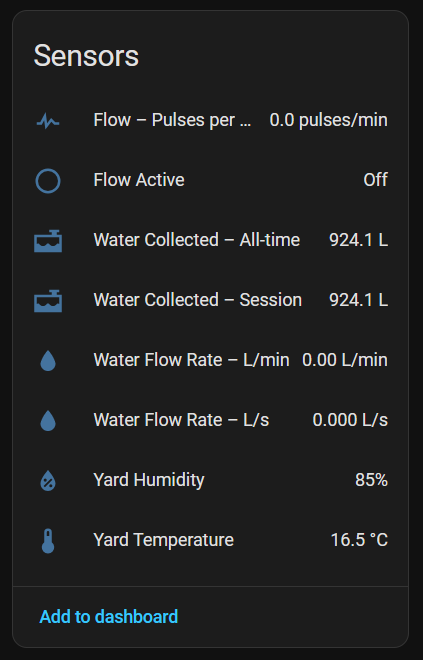
- Real-time Flow Rate: Calculates flow in both L/s and L/min.
- Total Volume: Tracks lifetime usage in Litres.
- Session Tracking: Uniquely, this configuration calculates “Session” usage. On every boot, it records the current total as a baseline (
baseline_litres) and tracks how much water has been used since that reboot. - Active Flow Detection: A binary sensor (
flow_active) detects if water is running (> 2 L/min) with hysteresis (it waits 2 seconds to turn on and must be inactive for 60 seconds to turn off), preventing rapid toggling during splashes.
2. Intelligent Visual Feedback (Neopixel Ring)
The code controls an 8-LED WS2812B ring (Pin 33) to provide immediate visual data without looking at a phone.
- Boot Animation: Runs a “rainbow” sequence (Red → Yellow → Green → Blue) on startup to confirm the hardware is working.
- Traffic Light Logic: The LED color changes based on flow intensity:
- < 10 L/min: Red (Low/Trickle)
- 10 – 30 L/min: Yellow (Medium)
- 30 – 60 L/min: Green (High)
- > 60 L/min: Blue (Very High)
- Breathing Effect: The LEDs don’t just stay on; they “breathe” (pulse brightness) using a sine wave calculation (
sin(t * 6.28...)) to give a smooth, organic look. - Status Indicators: The LEDs automatically turn off if:
- WiFi is disconnected.
- Water flow stops.
- The “Enable Flow Light” switch is toggled off.
3. Integrated Calibration Tool
The code includes a manual calibration workflow to ensure accuracy.
- Calibration Mode: A specific button (“Start 10 L Calibration”) resets a specific counter.
- The Logic: You press the button, fill a 10-liter bucket, and the ESP32 calculates the exact pulses-per-liter ratio.
- Logging: It outputs the calculated factor to the logs (
Measured X pulses/L – update YAML), allowing you to fine-tune theL_PER_PULSEconstant.
4. Environmental Sensing
- DHT Sensor: Connects a DHT sensor to Pin 19 to monitor Yard Temperature and Humidity. This allows the device to double as a weather station.
5. Web Interface & Management
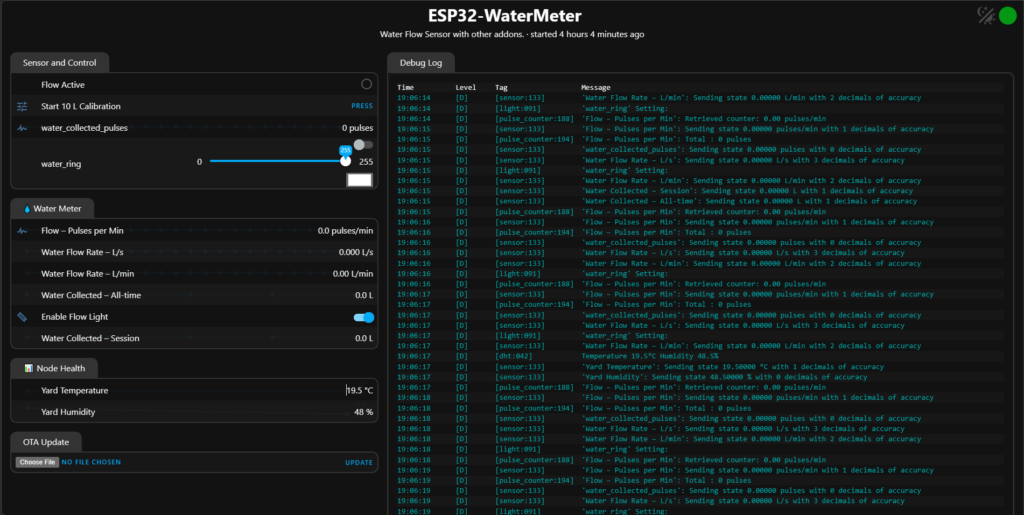
- Custom Web Server: The device hosts a web page (Port 80) protected by a username/password.
- Organized Groups: Entities are sorted into “Water Meter” and “Node Health” for a cleaner UI.
- WiFi Management: It acts as a captive portal/AP if the main WiFi fails and tracks connection status via a global variable.
6. Logic & Safety
- Debouncing: The flow detection uses filters to ignore momentary glitches.
- Startup Safety: Uses a
boot_doneglobal to prevent the main LED logic from overriding the boot animation. - Math Protection: Checks for
isnan(Not a Number) on boot to prevent database corruption if the sensor reads a null value.
ESPHome Complete YAML Code
esphome:
  name: esp32-watermeter
  friendly_name: ESP32-WaterMeter
  comment: Water Flow Sensor with other addons.
  min_version: 2025.7.4

  on_boot:
    priority: 600
    then:
      - delay: 1s
      - lambda: |-
          float t = id(water_collected_total).state;
          if (isnan(t)) t = 0.0f;
          id(baseline_litres) = t;
      - script.execute: boot_animation

esp32:
  board: esp32dev
  framework:
    type: arduino

logger:

api:
  encryption:
    key: "KEY_HERE"

ota:
  - platform: esphome
    password: "PASSWORD_HERE"

wifi:
  ssid: !secret wifi_ssid
  password: !secret wifi_password
  ap:
    ssid: "Esp32-Watermeter"
    password: "GrpWKhf8PsCq"
  on_connect:
    then:
      - globals.set: { id: wifi_ok, value: 'true' }
  on_disconnect:
    then:
      - globals.set: { id: wifi_ok, value: 'false' }

captive_portal:

###############################################################################
#  Globals
###############################################################################
globals:
  - id: baseline_litres
    type: float
    restore_value: no
  - id: calib_done
    type: bool
    restore_value: no
    initial_value: 'false'
  - id: led_enabled
    type: bool
    restore_value: yes
    initial_value: 'true'
  - id: wifi_ok
    type: bool
    restore_value: no
    initial_value: 'true'
  - id: boot_done
    type: bool
    restore_value: no
    initial_value: 'false'

###############################################################################
#  Calibration button
###############################################################################
button:
  - platform: template
    id: calib_btn
    name: "Start 10 L Calibration"
    icon: mdi:tune
    on_press:
      - globals.set:
          id: calib_done
          value: 'true'

###############################################################################
#  Scripts
###############################################################################
script:
  # --- 5-second rainbow boot animation ---
  - id: boot_animation
    mode: restart
    then:
      - light.turn_on: water_ring

      # RED
      - repeat:
          count: 8
          then:
            - light.addressable_set:
                id: water_ring
                range_from: !lambda 'return iteration;'
                range_to:   !lambda 'return iteration;'
                red: 1
                green: 0
                blue: 0
            - delay: 78ms

      # YELLOW
      - repeat:
          count: 8
          then:
            - light.addressable_set:
                id: water_ring
                range_from: !lambda 'return iteration;'
                range_to:   !lambda 'return iteration;'
                red: 1
                green: 1
                blue: 0
            - delay: 78ms

      # GREEN
      - repeat:
          count: 8
          then:
            - light.addressable_set:
                id: water_ring
                range_from: !lambda 'return iteration;'
                range_to:   !lambda 'return iteration;'
                red: 0
                green: 1
                blue: 0
            - delay: 78ms

      # BLUE
      - repeat:
          count: 8
          then:
            - light.addressable_set:
                id: water_ring
                range_from: !lambda 'return iteration;'
                range_to:   !lambda 'return iteration;'
                red: 0
                green: 0
                blue: 1
            - delay: 78ms

      - light.turn_off: water_ring
      - delay: 200ms
      - globals.set:
          id: boot_done
          value: 'true'

  # --- 10-litre bucket calibration (unchanged) ---
  - id: bucket_calibration
    mode: queued
    then:
      - globals.set: { id: calib_done, value: 'false' }

      - pulse_counter.set_total_pulses:
          id: flow_pulse_rate
          value: 0

      - wait_until:
          condition:
            lambda: 'return id(calib_done);'
          timeout: 5min

      - lambda: |-
          uint32_t p = (uint32_t) id(water_collected_pulses).state;
          float ppl = p / 10.0f;
          ESP_LOGI("calib", "Measured %.1f pulses/L – update YAML", ppl);
      - globals.set: { id: calib_done, value: 'false' }


###############################################################################
#  Web server
###############################################################################
web_server:
  port: 80
  version: 3
  auth:
    username: "ad"
    password: "pass"
  include_internal: true
  sorting_groups:
    - id: grp_water
      name: "Water Meter"
      sorting_weight: 1
    - id: grp_health
      name: "📊 Node Health"
      sorting_weight: 10

prometheus: {}
debug:
  update_interval: 5s

###############################################################################
#  Sensors
###############################################################################
sensor:
  # --- Raw pulse rate from sensor (pulses/min) ---
  - platform: pulse_counter
    id: flow_pulse_rate
    pin:
      number: 32
      mode: INPUT   # strongly consider an external pullup instead of INPUT_PULLUP
    name: "Flow – Pulses per Min"
    unit_of_measurement: "pulses/min"
    accuracy_decimals: 1
    update_interval: 1s
    use_pcnt: true

    total:
      id: water_collected_pulses
      internal: true
      unit_of_measurement: "pulses"
      state_class: total_increasing

    web_server:
      sorting_group_id: grp_water
      sorting_weight: 1

  # --- Instantaneous flow in L/s ---
  - platform: template
    id: flow_rate_l_s
    name: "Water Flow Rate – L/s"
    unit_of_measurement: "L/s"
    device_class: water
    state_class: measurement
    accuracy_decimals: 3
    update_interval: 1s
    lambda: |-
      // Litres per pulse (update after calibration)
      const float L_PER_PULSE = 1.0f / 60.0f;   // 60 pulses per litre example
      float pulses_per_min = id(flow_pulse_rate).state;
      float pulses_per_sec = pulses_per_min / 60.0f;
      return pulses_per_sec * L_PER_PULSE;
    web_server:
      sorting_group_id: grp_water
      sorting_weight: 2

  # --- Instantaneous flow in L/min (aggregated from same pulses) ---
  - platform: template
    id: flow_rate_l_min
    name: "Water Flow Rate – L/min"
    unit_of_measurement: "L/min"
    device_class: water
    state_class: measurement
    accuracy_decimals: 2
    update_interval: 1s
    lambda: |-
      const float L_PER_PULSE = 1.0f / 60.0f;   // same constant
      float pulses_per_min = id(flow_pulse_rate).state;
      return pulses_per_min * L_PER_PULSE;
    web_server:
      sorting_group_id: grp_water
      sorting_weight: 3

  # --- Total water in L (all-time) ---
  - platform: template
    id: water_collected_total
    name: "Water Collected – All-time"
    unit_of_measurement: "L"
    device_class: volume
    state_class: total_increasing
    update_interval: 5s
    lambda: |-
      const float L_PER_PULSE = 1.0f / 60.0f;   // keep in sync
      return id(water_collected_pulses).state * L_PER_PULSE;
    web_server:
      sorting_group_id: grp_water
      sorting_weight: 4

  # --- Session water in L ---
  - platform: template
    id: water_collected_session
    name: "Water Collected – Session"
    unit_of_measurement: "L"
    device_class: volume
    state_class: total_increasing
    update_interval: 5s
    lambda: |-
      return id(water_collected_total).state - id(baseline_litres);
    web_server:
      sorting_group_id: grp_water
      sorting_weight: 5

  - platform: dht
    pin:
      number: 19
      mode:
        input: true
        pullup: false
    model: AUTO_DETECT
    temperature:
      name: "Yard Temperature"
      device_class: temperature
      state_class: measurement
      web_server:
        sorting_group_id: grp_health
        sorting_weight: 1
    humidity:
      name: "Yard Humidity"
      device_class: humidity
      state_class: measurement
      web_server:
        sorting_group_id: grp_health
        sorting_weight: 2
    update_interval: 20s
###############################################################################
#  Manual LED enable/disable
###############################################################################
switch:
  - platform: template
    id: enable_led_switch
    name: "Enable Flow Light"
    icon: mdi:led-strip
    optimistic: true
    restore_mode: ALWAYS_ON
    turn_on_action:
      - globals.set:
          id: led_enabled
          value: 'true'
    turn_off_action:
      - globals.set:
          id: led_enabled
          value: 'false'
    web_server:
      sorting_group_id: grp_water
      sorting_weight: 5

###############################################################################
#  Flow-activity detector
###############################################################################
binary_sensor:
  - platform: template
    id: flow_active
    name: "Flow Active"
    lambda: |-
      // TRUE when flow > 2 L/min
      return id(flow_rate_l_min).state > 2.0f;
    filters:
      - delayed_on: 2s     # must stay > 2 L/min for 2 s
      - delayed_off: 60s   # must stay <= threshold for 60 s
    on_press:
      then:
        - logger.log: "Flow detected – ring will light"
    on_release:
      then:
        - logger.log: "Flow stopped – ring will turn off"


###############################################################################
#  WS2812B ring
###############################################################################
light:
  - platform: neopixelbus
    id: water_ring
    type: GRB
    variant: ws2812x
    pin: 33
    num_leds: 8
    default_transition_length: 0s
    restore_mode: ALWAYS_ON


###############################################################################
#  Flow → colour mapper
###############################################################################
interval:
  - interval: 1s
    then:
      - lambda: |-
          if (!id(boot_done)) return;

          // FIX: use .state
          if (!id(led_enabled) || !id(wifi_ok) || !id(flow_active).state) {
            auto off = id(water_ring).turn_off();
            off.perform();
            return;
          }

          const float flow = id(flow_rate_l_min).state;
          float r = 0, g = 0, b = 0;
          if (flow < 10)      { r = 1; }
          else if (flow < 30) { r = 1; g = 1; }
          else if (flow < 60) { g = 1; }
          else                { b = 1; }

          const float t  = millis() / 1000.0f;
          const float br = 0.1f + 0.7f * (sin(t * 6.28318f) * 0.5f + 0.5f);

          auto call = id(water_ring).turn_on();
          call.set_rgb(r, g, b);
          call.set_brightness(br);
          call.perform();
Home Assistant Logic: The ‘Water Hunter’ Algorithm
This is where we leave standard automation and enter “process control.” A simple “If X then Y” is not enough. We need a state machine that handles the uncertainty of municipal supply.
The Logic Flow
The “ESP32 Smart Water Meter” logic has three distinct phases:
- Phase 1: The Priming Window (The Gamble)
- Trigger: Time of day (e.g., 6:00 AM) OR Tank Level Low.
- Action: Turn Pump ON.
- The Problem: When the pump starts, the line might be empty. The flow sensor will read 0. If we check the sensor instantly, the logic will panic and shut down.
- The Solution: We must ignore the sensor for a “Priming Time” (usually 5-10 minutes). This allows the pump to suck air, create a vacuum, pull water from the main, and fill the suction pipe.
- Risk: Running dry for 10 minutes is generally acceptable for a cold pump once a day, provided it has some residual water in the casing.
- Phase 2: The Judgment (The Check)
- Action: After the Priming Window expires, check the
sensor.municipal_flow_rate. - Logic:
- Is Flow > 5 LPM?
- YES: Success! The hunt is successful. We have captured the supply. Enter Phase 3.
- NO: Failure. The municipal supply is not active, or the neighbor’s suction is too strong.
- Result: Turn Pump OFF. Send notification: “Dry Run Detected.”
- Action: After the Priming Window expires, check the
- Phase 3: The Sustain Loop (The Watchdog)
- Action: Keep the pump running, but watch the flow sensor like a hawk.
- Logic: If flow drops below 5 LPM for more than 30 seconds (debouncing for air bubbles), assume the supply has ended.
- Result: Turn Pump OFF. Send notification: “Supply Ended. Tank Filled X Liters.”
The Script (YAML)
Place this in your scripts.yaml. This script acts as the master controller. Your automations should call this script, not the switch directly.
alias: "ESP32 Smart Water Meter"
description: "Smart management of municipal suction pump with dry-run protection"
mode: restart
icon: mdi:water-pump

variables:
  # Tuning Parameters - Adjust these based on your reality
  priming_time: 10 # minutes to wait before first check
  min_flow_rate: 5.0 # Liters per minute threshold
  dry_run_cutoff_delay: 45 # seconds to tolerate low flow during operation (air bubbles)

sequence:
  # 1. Start the Hunt
  - service: switch.turn_on
    target:
      entity_id: switch.pump_relay
  - service: notify.mobile_app_admin
    data:
      title: "Water Hunter Active"
      message: "Pump ON. Priming for {{ priming_time }} mins."

  # 2. The Priming Phase (Blind Run)
  - delay:
      minutes: "{{ priming_time }}"

  # 3. The Judgment Day
  - choose:
      # Scenario A: Water Found!
      - conditions:
          - condition: numeric_state
            entity_id: sensor.flow_rate
            above: variables.min_flow_rate
        sequence:
          - service: notify.mobile_app_admin
            data:
              message: "Water Found! Flow is {{ states('sensor.flow_rate') }} LPM. Filling tank."

          # 4. Sustain Loop (Watchdog)
          # This loop runs until the pump is turned off externally (e.g. tank full)
          # OR until the flow drops.
          - repeat:
              while:
                - condition: state
                  entity_id: switch.pump_relay
                  state: "on"
                # Add tank full condition here if you have a float sensor
                #- condition: state
                #  entity_id: binary_sensor.tank_full
                #  state: "off"
              sequence:
                # Check for dry run condition
                - if:
                    - condition: numeric_state
                      entity_id: sensor.flow_rate
                      below: variables.min_flow_rate
                  then:
                    # Wait to confirm it's not just a bubble
                    - delay:
                        seconds: "{{ variables.dry_run_cutoff_delay }}"
                    # Check again
                    - if:
                        - condition: numeric_state
                          entity_id: sensor.flow_rate
                          below: variables.min_flow_rate
                      then:
                        - service: switch.turn_off
                          target:
                            entity_id: switch.pump_relay
                        - service: notify.mobile_app_admin
                          data:
                            title: "Hunt Ended"
                            message: "Supply Ended. Flow dropped to {{ states('sensor.flow_rate') }} LPM."
                # Pause before next loop iteration to save CPU
                - delay:
                    seconds: 5

      # Scenario B: No Water (Dry Run at Start)
      - conditions:
          - condition: numeric_state
            entity_id: sensor.flow_rate
            below: variables.min_flow_rate
        sequence:
          - service: switch.turn_off
            target:
              entity_id: switch.pump_relay
          - service: notify.mobile_app_admin
            data:
              title: "Dry Run Detected"
              message: "No Supply Detected after priming. Pump OFF."
Understanding the Variables
priming_time: 10: This is the most controversial setting. If you set it too low (2 mins), the pump might not have sucked water yet, and you get a false negative. If you set it too high (20 mins), you risk overheating the seals. 10 minutes is the empirical “Goldilocks” zone for most 1HP pumps in India.dry_run_cutoff_delay: 45: Municipal lines often “sputter.” Air pockets travel through the line, causing flow to drop to zero for 5-10 seconds. If your logic cuts off instantly, you lose the supply. A 45-second buffer allows the pump to “power through” the air pocket and regain the water column.
Calibration & Troubleshooting: The ‘Bucket Test’
Never trust the code until you verify it with physics. Sensors vary, pipe diameters vary, and turbulence varies.
The Calibration Procedure
- The Setup: Get a standard 20-liter paint bucket (or any container of known volume).
- The Test:
- Trigger the pump manually.
- Hold the outlet pipe (or a hose connected to it) into the bucket.
- Start a stopwatch the moment water hits the bucket bottom.
- Stop the stopwatch the moment the bucket overflows (or hits the 20L mark).
- The Math:
- Time: 45 seconds.
- Volume: 20 Liters.
- The Correction:
- Check Home Assistant history. What was the average flow during that 45 seconds?
- Scenario A: HA reported 30 LPM. The sensor is reading high.
- New K-Factor = Current Factor (288) * (Reported / Real)
- 288 times (30 / 26.6) = 324.8.
- Update YAML:
lambda: return x / 325.0;
- Scenario B: HA reported 20 LPM. The sensor is reading low.
- New K-Factor = 288 \times (20 / 26.6) = 216.5.
- Update YAML:
lambda: return x / 216.5;
Troubleshooting Common Issues
- Problem: Erratic Flow Readings (Jumping 10 -> 0 -> 15)
- Cause: Cavitation or Turbulence.
- Fix: Check if you respected the 10D straight pipe rule. If the sensor is right next to an elbow, the water is swirling. Move the sensor further down the line. Alternatively, check the suction filter; if it’s blocked, the pump is cavitating, creating bubbles that confuse the sensor.
- Problem: Sensor Reads 0 but Water is Flowing
- Cause: Dead sensor, disconnected wire, or stuck impeller.
- Fix: Verify 5V at the sensor. Check the Yellow wire continuity. Tap the sensor body gently—sometimes debris (sand/stones common in municipal water) jams the rotor. Always install a mesh filter before the pump!
Conclusion: Owning Your Water Security
By building the ESP32 Smart Water Meter, you have graduated from a passive consumer to an active resource manager. You are no longer waking up at 4 AM to check a tap. You are sleeping soundly while your silicon sentinel checks the lines, grabs the water, and shuts down safely when the city supply fails.
This project is a perfect example of appropriate technology. We aren’t using cloud AI or blockchain. We are using robust physics (Hall effect), reliable hardware (ESP32/Relays), and logical scripts (Home Assistant) to solve a fundamental human need: water security.
Go forth and automate. May your tanks be full, your pumps be cool, and your dry-run notifications be silent.
Appendix: Safety Warning
Working with 220V AC Mains is dangerous. Always disconnect power before touching wires. Ensure your enclosure is earthed. The 10D/5D plumbing rule is critical for accuracy but requires cutting pipes—measure twice, cut once. If you are unsure about mains wiring, hire a certified electrician for the AC side while you handle the 5V DC side.