
Bambu Lab H2D — Large-Format Dual-Nozzle, Laser-Ready Flagship
The Bambu Labs H2D is Bambu Lab’s new all-in-one “personal manufacturing hub.” It enlarges the build volume to 350 × 320 × 325 mm, adds a fast-switch dual-nozzle extruder, active 65 °C chamber heating, and accepts bolt-on 10 W / 40 W laser-engraving and drag-knife / pen-plotter heads. Starting at $1,999 USD / ≈ ₹ 2.25 – 4.0 lakh (variant-dependent), it targets prosumers who need 3-in-1 capability but still crave Bambu-class speed (1,000 mm s-¹) and automation. Its closest rivals are Snapmaker Artisan, xTool S1, and Glowforge Aura, yet none match the H2 D’s CoreXY speed or Bambu’s AMS ecosystem.
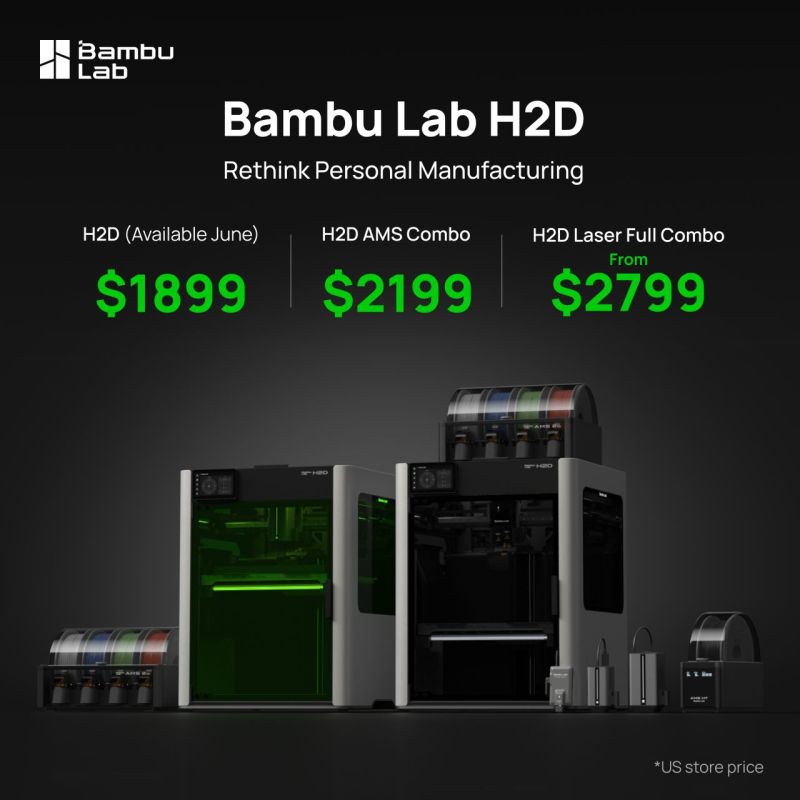
Bambu Lab H2D – Key Specs:
| Spec / Feature | Bambu Lab H2D |
|---|---|
| Build volume | Single-nozzle: 325 × 320 × 325 mm Dual-nozzle: 300 × 320 × 325 mm |
| Max speed / accel | 1,000 mm s-¹ / 20,000 mm s-² (CoreXY, input shaping) |
| Hotend / nozzle | Hardened-steel, 350 °C (0.2-0.8 mm); optional High-Flow 65 mm³ s-¹ kit |
| Chamber | Active 65 °C heater + HEPA (H12) & carbon filtration |
| Tool-head options | Dual FDM, 10 W / 40 W laser (+ rotary), drag-knife, pen-plotter |
| Vision & AI | Four cameras (nozzle, tool-head, BirdsEye, live-view), 36 sensors, flame & air-print detection |
| AMS compatibility | AMS 2 Pro / AMS HT with active drying & faster spool changeover |
| Price (base) | $1,999 USD (Bambu US) / ₹ 2,24,999 INR (Robu.in “without AMS”) |
| Combos | ₹ 3,29,999 (10 W laser) / ₹ 3,99,999 (40 W laser) on Robu.in; same on WOL3D |
Official resources
• Product page
• Full tech specs
• User-wiki
• Official launch video
Whats New in Bambu Labs H2D:
- Bigger & hotter – ~2× the printable volume and 350 °C hardened hotend for PPS, PPA-CF/GF and some PEKK/PEI blends.
- Dual-nozzle “lift-and-lock” system (< 25 µm offset) prints soluble supports or soft+rigid combos with near-zero purge waste.
- Active chamber heating to 65 °C reduces warp on nylon, PC, CF composites.
- Multi-function chassis – quick-release carriage accepts laser & blade modules; BirdsEye camera gives 0.3 mm “what-you-see-is-what-you-get” alignment.
- Vision-encoder plate (optional) claims 50 µm motion accuracy, auto hole/contour compensation.
Limitations & Trade-offs
- Cost escalates fast – full “Laser Full Combo” with 40 W module and AMS 2 Pro tops $3,499 USD / ₹ 4 lakh.
- Closed ecosystem persists: still proprietary firmware and cloud-leaning workflow; LAN-only mode exists but lacks OTA updates & SD-card explorer, raising the same concerns voiced for X1C.
- Tool-changer vs IDEX – dual nozzles share one carriage; only one material prints at a time (unlike full IDEX).
- Laser is class-4 when running; enclosure windows are certified, but you’ll still want an external extractor or purifier.
- Weight & power – 31 kg and peaks at 2,200 W, so plan a sturdy bench and 15 A circuit (220 V).
- Community mods lag behind because of closed firmware; Klipper, OctoPrint USB control, or third-party tool-heads remain unsupported.
Competitor Snapshot
| Model | Price | Build | Multi-function | Open-Source? | Key Differences |
|---|---|---|---|---|---|
| Bambu H2D | $1,999-3,499 | 350 × 320 × 325 mm | Laser (10 / 40 W), knife, pen* | ❌ | Fastest CoreXY (1 m s-¹); AMS ecosystem |
| Snapmaker Artisan | $2,999 (3-in-1) Snapmaker US | 400 × 400 × 400 mm | 40 W laser, 200 W CNC | Partially | Slower (≤300 mm s-¹); larger but heavier |
| xTool S1 (40 W) | $2,399 (laser-only) | N/A (sheet) | 2D laser & blade | N/A | No 3D printing; stronger laser |
| Glowforge Aura | $1,199 (laser-only) | N/A | CO₂ laser cutter | Cloud-locked | No 3D printing; weaker CO₂ laser |
| Prusa XL 1-tool | $2,499 + | 360 × 360 × 360 | 3DP only | ✅ | Open-source, slower, no laser/knife |
For studios that want one machine to print a carbon-fiber bike-helmet shell, cut its TPU liner, and engrave custom decals, the H2D is unmatched. It prints as fast as a P1 S, out-volumes an X1 C, and adds well-integrated 2D tool-heads. If you’re a pure 3D-printing hobbyist, a P1 S Combo ($949) or X1 C Combo ($1,449) still provides better value. But if you sell products, prototype fixtures, or need the print–cut–engrave trifecta in one enclosed CoreXY platform, H2D just leap-frogged every prosumer alternative. Be prepared, however, to buy into Bambu’s walled garden and budget for the upgrade kits that unlock its full potential.
Bambu Lab’s Closed Ecosystem: What You Need to Know
While Bambu Lab printers impress with their hardware and performance, it’s important to understand the software and ecosystem limitations that come with them. Bambu’s ecosystem is largely closed-source. Unlike Prusa, LulzBot, or many RepRap-derived printers that run open-source firmware (Marlin/Klipper) and allow extensive user modification, Bambu Lab runs proprietary firmware on their machines. The X1 series printers are essentially embedded Linux systems (the X1C/X1E run Linux + real-time motion firmware; P1P/P1S use a similar architecture minus Linux). Bambu Studio (the slicer) was initially closed-source despite being based on PrusaSlicer, though after community pressure Bambu did release its source code – partially to comply with open-source licenses. Still, practical integration with third-party software is limited.
For example, OctoPrint cannot directly connect to a Bambu printer via USB serial as it would with a typical printer – Bambu printers communicate through WiFi/LAN using a custom protocol. There are community workarounds (like the BambuOctoGateway and OctoEverywhere plugins that interface with Bambu’s network API), but it’s not plug-and-play. Klipper, a popular open-source firmware that many enthusiasts install on other printers for speed, is not officially supported on Bambu machines. Some hackers on Reddit have made progress in running Klipper on a P1S by bypassing the stock controller, but this is very experimental. In short, when you buy a Bambu Lab printer, you are somewhat locking into their ecosystem – using Bambu Studio (or its forks) for slicing to fully utilize features, relying on Bambu’s firmware updates, and using the Bambu Handy app or Bambu cloud/LAN for remote control.
Cloud vs LAN: Bambu’s workflow encourages cloud connectivity – slicing in Bambu Studio and sending files to the printer via the Bambu cloud (which then relays to your device). Some users, however, prefer offline use for privacy or reliability. Bambu does offer a LAN mode where you can control the printer directly over your local network (and with the latest firmware, you can even do firmware updates via SD card, not requiring internet). But note, as of firmware 1.05+, certain functions still don’t work in LAN-only mode: for instance, you cannot update firmware or view the printer’s SD card contents in pure LAN mode – Bambu confirmed these are disabled without cloud and had “no plans” to change that as of early 2024.
They later introduced offline firmware update via SD card as a compromise. The latest firmware updates (late 2023) stirred some controversy by requiring login for features that previously didn’t need it. One example reported was the “disable cloud” option being removed or certain camera features needing a Bambu account login. The community forums and YouTube channels have voiced concern over this increasing cloud reliance, urging users to be cautious about updates. Bambu Lab has responded to some feedback (like enabling the aforementioned offline updates for X1E after pro users complained). If offline usage is a priority for you, it’s advisable to stay informed via Bambu’s release notes and community discussions before applying firmware updates. There is also an unofficial firmware “fork” by some community members aiming to restore or enhance offline features but use that at your own risk.
In practical terms, many users operate Bambu printers just fine in LAN mode (using Bambu Studio on PC to send files directly over local WiFi, or using the microSD card sneaker-net method). The printers will print autonomously without internet, and you can use the Bambu Handy app in LAN mode to monitor prints on your WiFi. Just be aware that some “cloud” conveniences (like cloud slicing storage, sharing to the phone app from anywhere, automatic firmware notifications, etc.) won’t work if you keep the device fully offline.
Proprietary Parts: Another aspect of the closed ecosystem is that replacement parts and upgrades generally have to come from Bambu Lab. For instance, the nozzle and hotend are custom-designed; while you can swap in third-party nozzles of similar size, things like the toolhead PCB, lidar module, cameras, etc., are all Bambu-specific. Tom’s Hardware noted “proprietary replacement parts” as a con for the P1S. This means down the line (say 5-10 years), if Bambu Lab were to discontinue a model, sourcing spares might be costlier or harder than for, say, an Ender 3 (which has tons of third-party part support). The flip side is Bambu has a robust support infrastructure right now and sells spares on their site. Just keep in mind that you can’t flash a generic firmware or easily swap in a different controller board as you might on other open printers – Bambu’s hardware and software are integrated.
Despite these limitations, many users willingly choose Bambu for the phenomenal out-of-the-box experience. As one reviewer put it, the X1 series offers “fresh thinking, no tinkerin’”. If you value that convenience and are okay with a closed system, you’ll likely be very happy. But if you’re an open-source purist or love to tweak firmware and deeply customize your machine, Bambu’s approach “will present a quandary”. It’s akin to choosing an iPhone (closed but polished) vs an Android (open and customizable) – each has its audience.
Klipper, OctoPrint, etc.: Currently, you cannot run Klipper firmware on Bambu printers without essentially gutting the controller – which defeats the purpose of buying a Bambu. OctoPrint cannot connect via USB as mentioned, but you can use the Bambu API to integrate with OctoPrint/others (there’s a plugin “BambuPlugin” for OctoPrint that can send prints to Bambu over network). So, basic integration is possible, but advanced third-party addons (like OctoPrint’s many plugins for timelapse, custom macros) won’t have the same control as they do with open firmware printers.
The bottom line: Bambu’s printers are incredible machines but expect to use them largely in the way Bambu intends. For most users – those who just want to hit print and get great results – this is a fair trade. For others who enjoy the freedom of open source, this could be frustrating.
Which Bambu Lab printer is right for you?
It boils down to your budget and needs:
- A1 Mini is perfect for beginners and casual makers on a budget – it’s small, quiet, and extremely user-friendly, though limited to PLA/PETG. Think of it as a more advanced alternative to a Prusa Mini or Ender for around $300.
- A1 (the larger bed-slinger) offers big build volume and multi-color printing at a low cost, ideal for those who want to print cosplay-sized pieces or multiple parts at once without spending a fortune. It’s like getting a Prusa MK4-sized printer with automated features for ~$400.
- P1P is for the tinkerer who wants raw CoreXY speed at a mid-range price – great if you don’t mind printing mods and gradually upgrading the machine. It’s already very capable out-of-box (essentially an X1 minus frills), and you can add enclosures, fans, etc. as you go.
- P1S is arguably the best value for all-round use in 2024 – it’s fast, enclosed, and versatile. If you have ~$700, the P1S will let you print almost anything (PLA to ABS) reliably, and you can tack on the AMS later if you want multi-color. It’s a fantastic “first serious printer” for someone with a bit more budget who wants a no-hassle, high-performance experience.
- X1 Carbon is for the enthusiast or pro-user who wants the absolute cutting edge features. It simplifies printing challenging materials and multi-color prints with AI-assisted ease. If you value things like first-layer perfection via LiDAR, remote print failure warnings, or printing NylonCF like butter, the X1C is worth it. It’s also a workhorse – many X1C owners run farm setups because of its speed and consistency. Just remember it’s a closed environment, so you won’t be swapping in custom firmware.
- X1E is targeted at professionals, schools, or businesses – its premium is only worthwhile if you need the extras (e.g., you’re regularly printing polycarbonate/PEEK prototypes, or your IT policy requires fully offline devices on enterprise WiFi). For a well-heeled hobbyist, an X1E will certainly be an amazing machine, but from a value perspective the X1C or P1S makes more sense unless money is no object.
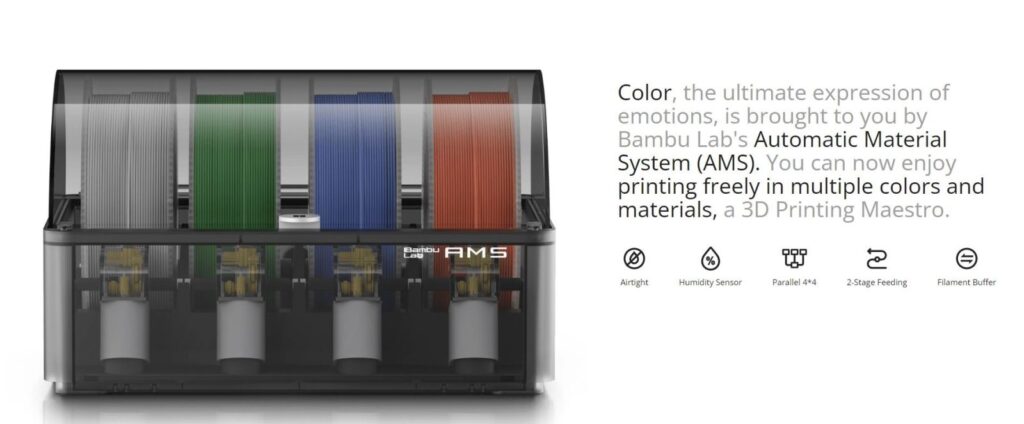
One more thing to consider: AMS (Automatic Material System). Bambu’s AMS (both the original and the new “AMS Lite”) is a unique selling point. No other brand has a comparably easy multi-color system that can load/unload four filaments intelligently with RFID tagging and minimal user intervention. If multi-color printing is a priority for you, Bambu Lab is a top choice (only Prusa’s upcoming MMU3 or something like a Palette can compete, and those are either less integrated or not yet proven). The AMS does introduce complexity – filament needs to be dry and not too brittle to swap reliably, and as mentioned, it purges filament (waste) for color changes. But the ability to print supports in a different material, or do color transitions, adds a lot of creative freedom. All Bambu printers from the P1P up support AMS, and even the A1 Mini supports the smaller AMS Lite.
In the broader market, Bambu Labs printers have set new benchmarks. They brought features that were once only on $20k industrial machines (like LiDAR, active calibration, high accelerations) into consumer printers. This has pressured other companies to innovate – hence Creality’s fast CoreXY entries and Prusa’s updates. For a consumer in 2025, this competition is great news.
Finally, be aware that Bambu Lab is a young company (founded in 2020) – their pace of updates is rapid. Keep an eye out for firmware/software updates (read the notes to decide if you want them) and new product announcements. For instance, rumors and teasers suggest Bambu may explore bigger format printers or IDEX (dual independent extruder) machines in the future, given the codename “H2D” seen in their documentation index (which might hint at a dual-head “Tool Changer” or something along those lines). As of mid-2025, the lineup we covered is current, and all models are available.
In summary, Bambu Lab offers a range of 3D printers that can suit everyone from a newbie maker to an industrial engineer. They are fast, smart, and convenient, but come with the trade-off of a closed ecosystem. If you’re okay with that, you’ll likely find that a Bambu printer “just works right from the box… reliable, precise, fun,” as one user put it. Happy printing!