
Bambu Lab has rapidly become a leading name in desktop 3D printing, known for its high-speed CoreXY technology and out-of-the-box reliability. In this comprehensive guide, we’ll break down every Bambu Lab 3D printers – from the cheapest entry-level model to the latest, most expensive flagship – covering their exact features and limitations.
For each printer, you’ll find an at-a-glance specs table (with prices in both USD and INR) and links to official listings, Indian retailers (Robu.in/WOL3D), and product manuals. We also highlight direct competitors from Prusa and Creality for each Bambu model, to help you weigh your options. Finally, we discuss Bambu Lab’s closed-source ecosystem – including its stance on open-source firmware (or lack thereof) and a recent firmware update that affects offline usage.
Table of Contents
Let’s dive in, starting from the budget-friendly end of the lineup and moving up to the professional tier.
Bambu Lab A1 Mini – Compact High-Speed Starter
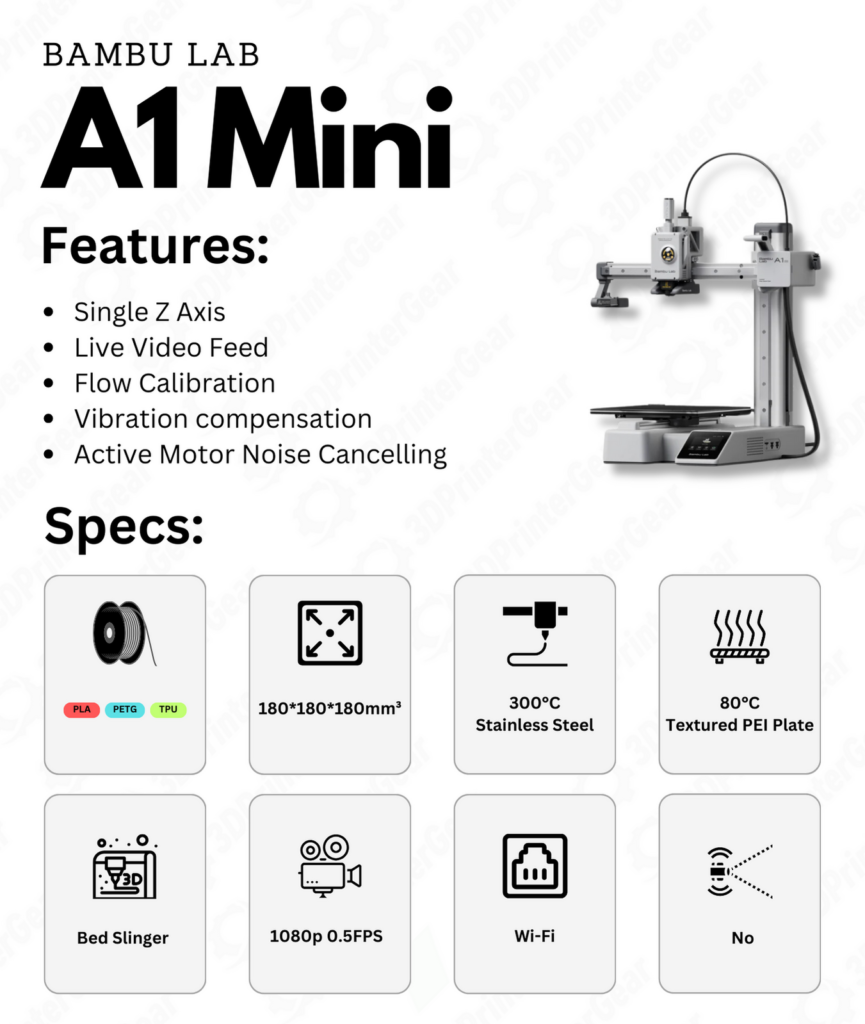
The Bambu Lab A1 Mini series is the most affordable Bambu Lab 3D Printers in lineup, offering high-end features in a compact form factor. Despite its small 180×180×180 mm build volume, the A1 Mini delivers up to 500 mm/s print speed with 10,000 mm/s² acceleration, thanks to the same advanced motion control found in Bambu’s larger models. It comes fully assembled and pre-calibrated, making it a plug-and-play gateway to 3D printing for beginners.
The A1 Mini includes automatic bed leveling, vibration compensation, and flow rate calibration, so users don’t need to tinker – the printer self-tunes for each job. It’s also one of the quietest printers available (≤48 dB in “silent mode”), suitable for home and classroom use. Crucially, the A1 Mini supports the new AMS Lite system for multi-color printing, bringing multi-material capabilities to everyone at a lower cost.
Limitations: The A1 Mini’s compact size means it can’t print large models, and its heated bed tops out at 80 °C. This is sufficient for PLA and PETG, but it’s not ideal for ABS/ASA or other high-temp filaments (Bambu Lab explicitly marks ABS/PC/nylon as “Not Recommended” on this model). The frame is open (no enclosure), so printing heat-sensitive materials is challenging. Also, this makes the unit unusable in a house full of pets and their fur. Unlike the higher-end Bambu printers, the A1 Mini does not come with a LiDAR sensor or hardened nozzle by default – its nozzle is stainless steel and can handle up to 300 °C, which is fine for most standard materials but will wear faster with abrasive carbon/glass fiber filaments. That said, for the price, the A1 Mini packs incredible tech.
Bambu Lab A1 Mini – Key Specs:
| Specification | A1 Mini |
|---|---|
| Build Volume | 180 × 180 × 180 mm |
| Nozzle & Hotend | 0.4 mm stainless steel nozzle (quick-swap); All-metal hotend, max 300 °C |
| Heated Bed | Textured PEI plate; max 80 °C bed temp |
| Max Print Speed | 500 mm/s; 10,000 mm/s² acceleration (input shaping) |
| Features | Auto bed-leveling, vibration & flow compensation, ≤48 dB quiet modebambulab.com, AMS Lite support (optional multi-color) |
| Ideal Materials | PLA, PETG, TPU, PVA (multi-color capable) |
| Not Recommended | ABS, ASA, PC, PA (nylon), etc. – due to 80 °C bed and open frame |
| Price (USD) | $299 (base printer); $459 with AMS Lite (Combo) |
| Price (INR) | ₹22,499 (base) / ₹39,999 (Combo) – approx. via Robu.in |
Official Links:
Bambu A1 Mini – Product Page
Robu.in Listing (India) ・ WOL3D Listing (India)
User Manual/Wiki
Competitors: In the compact category, the A1 Mini’s closest rivals are the Prusa Mini+ and Creality Ender 3 V2 Neo. Prusa’s Mini+ (approx. $349) offers a similar 180 mm cube build volume and Prusa’s renowned reliability, but it prints far slower and lacks multi-color out-of-box (Prusa requires an add-on for multi-material). Creality’s Ender-3 series (e.g. Ender 3 V2 Neo) hits a lower price, but again, it’s a basic single-color printer that can’t match the A1 Mini’s speed or automation. Essentially, the A1 Mini stands out for beginners who want fast, hassle-free printing without the usual tinkering – a user review even noted it “changed [the] hobby from ‘tinkering’ to ‘printing’” because of its reliability.
Bambu Lab A1 – Large Bed-Slinger with Multi-Color on a Budget
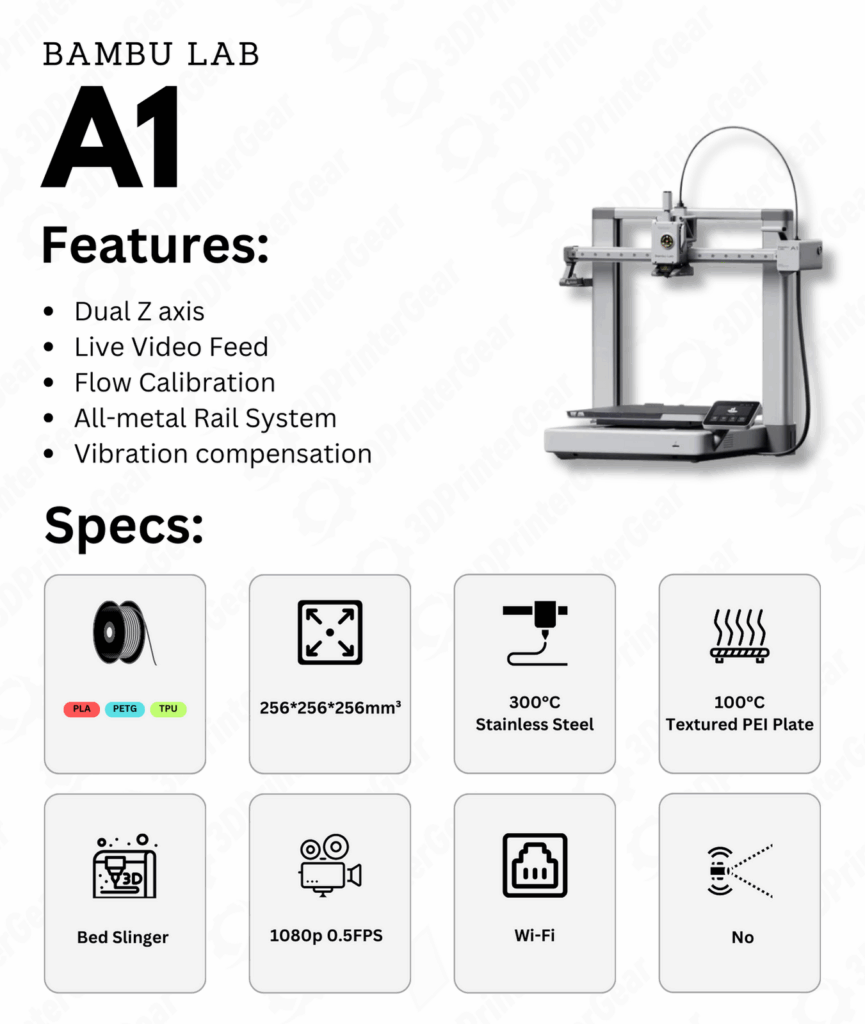
Stepping up from the mini, the Bambu Lab A1 offers the same generous 256 × 256 × 256 mm build volume as Bambu’s flagship models, but in a more affordable bed-slinger (moving bed) design. This printer is essentially Bambu’s answer to a Prusa-style machine – it trades the expensive CoreXY gantry for a simpler motion system while still delivering high performance. The A1 inherits most of the A1 Mini’s features and then some: fully automated calibration (including X/Y resonance and pressure advance tuning every print), the quick-swap hotend design, and support for the AMS Lite unit for multi-color printing. Despite being a moving-bed design, Bambu claims the A1 can achieve similar speeds to their CoreXY models – it features a rigid steel frame, linear rails, input shaping via accelerometers, and the same powerful controller, allowing up to 500 mm/s printing while maintaining quality. Essentially, the A1 provides flagship-sized prints and multi-material capability at a mid-range price, which is a big deal for budget-conscious makers.
Limitations: As a bed-slinger, the A1’s moving bed (Y-axis) means it may not sustain ultra-high speeds with heavy prints as gracefully as the CoreXY Bambu printers. Fast print moves on a moving-bed design can introduce more vibration on large parts, so real-world speeds might be somewhat lower for big models (though still impressively fast for an i3-style printer). The A1’s frame is partially open – it does not come with a full enclosure by default, which again limits high-temp filament use. However, the A1’s heated bed likely reaches around 100 °C (higher than the Mini’s) to better handle ABS; combined with the optional enclosure panels (if available) or user mods, printing ABS/ASA is more feasible than on the Mini. Still, without an active chamber heater or high-temp build chamber, the A1 isn’t as suited for engineering materials as the enclosed CoreXY models. The nozzle and extruder are the same as the Mini (0.4 mm steel, 300 °C capable), meaning abrasive filaments will require an upgrade to a hardened nozzle.
On the software side, the A1 runs Bambu’s closed system (detailed later), so while it’s user-friendly (“as easy as your smartphone,” Bambu says), it doesn’t play openly with community mods. Overall, these are reasonable trade-offs given the A1’s price point.
Bambu Lab A1 – Key Specs:
| Specification | Bambu Lab A1 |
|---|---|
| Build Volume | 256 × 256 × 256 mm (same as X1/P1 series) |
| Motion System | Cartesian (Bed-slinger) on linear rails; auto X/Y resonance calibration |
| Nozzle & Hotend | 0.4 mm stainless steel; All-metal hotend, max ~300 °C (hardened nozzle upgrade optional) |
| Heated Bed | Textured PEI plate; up to ~100 °C (suitable for PLA, PETG, some ABS) (Exact spec not published, but likely ~100 °C) |
| Max Speed | 500 mm/s print speed, 20,000 mm/s² acceleration (input shaping, similar to P1S/X1C) |
| Features | Full auto-calibration (bed leveling, Z-offset, flow, resonance); quick-swap hotend; AMS Lite support (4-color); 2.4″ color touchscreen interface |
| Filament Support | PLA, PETG, TPU, etc. (ABS/ASA with enclosure recommended; CF/Nylon not ideal without upgrades) |
| Price (USD) | $399 (base printer MSRP) – a large-volume, multi-color capable machine under $400 |
| Price (INR) | ₹32,499 (approx. base price on Robu.in); ₹49,999 for A1 Combo with AMS Lite |
Official Links:
Bambu Lab A1 – Official Site
Robu.in Listing (India) ・ WOL3D Listing
Manual: A1 Mini Manual
Competitors: The Bambu A1 directly targets printers like the Prusa i3 MK3S+/MK4 and Creality’s mid-range machines. Prusa MK4 (kit ~$799) offers a similar build volume (250 mm cube) and open-source ecosystem. However, the A1 significantly undercuts it on price and trounces it in speed – the MK4’s “Speed Mode” is ~200 mm/s and not as fine-tuned, whereas the A1 can approach 500 mm/s with its calibration systems. Prusa’s advantage is its fully open firmware and proven longevity, but Bambu has set “a new standard for 3D printing” in ease-of-use and speed at this price. From Creality, a comparable alternative would be an Ender 3 S1 Pro or Ender 5 S1: these are around $400-$500, with build volumes in the 220–300 mm range. The Ender 3/5 series, while popular, require manual upgrades/tuning to reach high speeds and don’t offer multi-color printing or the kind of automation the A1 has. Another new competitor is the Creality K1 (CoreXY, ~$599) – faster and enclosed, but smaller volume (220 mm cube).
In summary, the Bambu A1 stands in a unique spot: large build volume, multi-color capability, and high-speed printing at a budget cost, albeit in a closed ecosystem. It’s an excellent option for makers who want Prusa-like quality and reliability without Prusa’s price, so long as they can live without open-source firmware.
Bambu Lab P1P – High-Speed CoreXY on a Budget (DIY Friendly)
The Bambu Lab P1P is a stripped-down version of Bambu’s flagship, delivering the same CoreXY kinematics and blazing speed as the X1 series, but at a lower cost. It features a sturdy welded steel frame and a 256 × 256 × 256 mm build volume – all the mechanical potential of the X1 Carbon, but without the luxury add-ons.
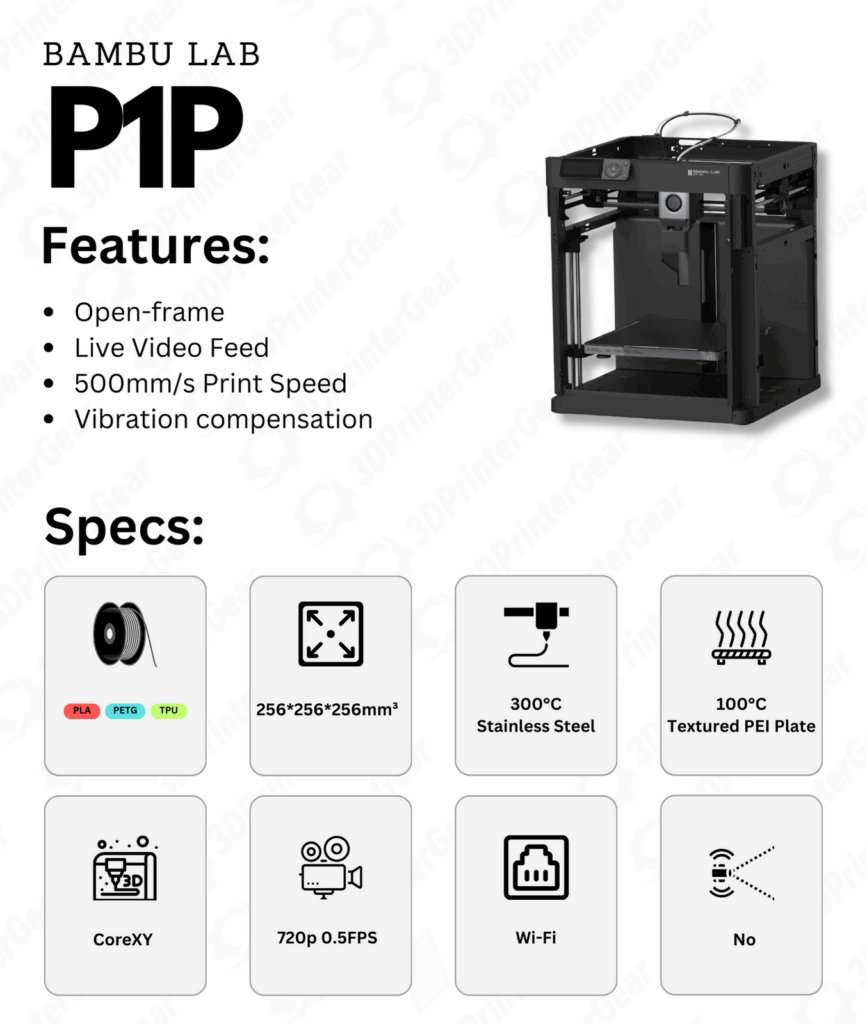
Out of the box, the P1P can hit up to 500 mm/s print speeds and 20,000 mm/s² acceleration, using input shaping and active vibration compensation just like the X1C. It comes with automatic bed leveling and the same direct-drive all-metal hotend (max 300 °C) as the X1 series, enabling it to print a wide range of materials reliably. The P1P’s unique twist is its DIY customization: it ships with plain bare-bones panels, encouraging users to 3D print their own side panels or accessories (Bambu provides template files so you can personalize the look of your P1P). This not only saves cost, but it turned the P1P into a community favorite for modders. Essentially, the P1P offers X1-class performance for roughly half the price of the X1C, making high-speed, high-quality 3D printing more accessible. It even supports the AMS (Automatic Material System) for multi-color printing – you can add the AMS unit later to turn the P1P into a 4-color(or 12 color) printer when needed. Tom’s Hardware awarded the P1P an Editor’s Choice, noting it “just works” and is a “super-fast printing workhorse” at an affordable price.
Limitations: To hit that lower price, the P1P omits or simplifies some features. It has no built-in enclosure – it’s an open-frame printer (great for PLA, but if you want to print ABS or ASA, you might need the optional enclosure kit or DIY enclosure). There’s no fancy LiDAR sensor for first-layer inspection on the P1P (the X1C has a micro LiDAR) and the P1P’s bed leveling is 1-point plus mesh (versus the X1’s advanced 2-point system) – in practice, the P1P still levels well, but lacks the X1’s extra layer of first-layer assurance. Cooling is slightly toned down: the P1P comes with a standard part cooling fan (users can add the auxiliary fan upgrade if needed). The P1P also originally shipped without a camera; it does have a port for a camera and Bambu now offers an add-on P1P camera module, but unlike the X1 series, time-lapse and remote monitoring aren’t available out of the box.
The display on the P1P is a simple 2.7″ monochrome status screen with control buttons (no touchscreen), which is functional but not as nice as the X1’s tablet-like screen. Additionally, some components are not hardened: the extruder gears and 0.4 mm nozzle are steel and stainless steel respectively (the X1C’s are hardened steel), meaning the P1P cannot handle abrasive carbon-fiber filaments unless you manually upgrade the hotend/nozzle (which Bambu allows – they sell hardened hotend kits). Finally, the noise level is higher – the P1P’s fans and motion can be loud (users report it’s noticeable, as also noted in P1S review). In short, the P1P sacrifices some comfort and polish (and some “smart” features) but not the core printing performance. It’s still extremely fast and reliable, but more barebones – which for many hobbyists is a smart trade-off.
Bambu Lab P1P – Key Specs:
| Specification | Bambu Lab P1P |
|---|---|
| Print Volume | 256 × 256 × 256 mm (cube) |
| Motion System | CoreXY high-speed (500 mm/s, 20k mm/s² accel) – Input Shaping & Pressure Advance enabled |
| Extruder & Nozzle | Direct-drive dual-gear extruder (steel gears); 0.4 mm stainless nozzle, all-metal hotend (≤300 °C) |
| Bed & Temps | Heated bed up to 100 °C; spring steel PEI plate (textured) |
| Features | Auto bed leveling; Wi-Fi cloud/LAN printing; AMS compatibility (up to 16 colors); basic 128×64 LCD screen & knob; vibration & flow calibration (no LiDAR) |
| Notable Omissions | No enclosure (open frame); no built-in camera (optional add-on); no auxiliary part fan (user can add); no chamber heater/filter (for ABS use enclosure kit) |
| Materials | PLA, PETG, TPU, ABS, ASA, PA, etc. (ABS/ASA recommended with enclosure add-on) – can print most filaments up to 300 °C |
| Price (USD) | $699 launch MSRP, often on sale around $399-$599 |
| Price (INR) | ~₹50,000 – ₹70,000 (varies; not always in stock. Note: P1P is sometimes superseded by P1S in India) |
Official Links:
Bambu Lab P1P – Official Store Page
Robu.in (P1P) ・ WOL3D Listing
P1P User Manual (Bambu Wiki)
Competitors: The P1P sparked a mini “speed race” in 3D printing. Its primary competitors are Creality’s K1 and Prusa’s MK4 (in a sense). Creality K1 is a CoreXY launched after the P1P, with similar claims of 600 mm/s speed. The K1 (priced ~$599) comes with an enclosure and even an AI camera, aiming squarely at Bambu’s market. However, early reviews suggest the K1’s print quality and calibration aren’t as refined as Bambu’s – out of the box, the P1P/P1S still had an edge in reliability and software. Creality’s firmware is more open than Bambu’s, but also less polished. On the Prusa side, the Prusa MK4 (from $799) isn’t CoreXY, but Prusa introduced features like Input Shaper to boost speeds. Even so, the Bowden-drive MK4 cannot sustain the kind of acceleration a CoreXY like P1P can. Where Prusa wins is in community and open-source (and a rich ecosystem of mods), whereas the P1P wins in raw performance per dollar. Notably, Prusa doesn’t offer multi-color at this price (their MMU2S is an add-on). Another competitor is the AnkerMake M5 (approx $799) – a fast Cartesian with camera – but again, it’s pricier and still slower than P1P in practice. In summary, the P1P stands as a disruptor: it delivered “quality and speed as yet unseen at this price point”.
For those who want core performance and are willing to add upgrades themselves, the P1P is a top choice. Many in the community compare P1P to a “sports car with manual windows” – the engine is the same as the luxury model, you just crank some windows yourself.
Bambu Lab P1S – Enclosed CoreXY for Multi-Material and ABS
The Bambu Lab P1S is essentially an upgraded P1P – it takes that high-speed CoreXY foundation and adds an enclosure and other quality-of-life features that were missing in the P1P. The result is a printer that “hits a sweet spot” for makers, offering flagship-level speed with an enclosure for better material compatibility. The P1S comes fully enclosed with clear panels and a front door, plus a carbon air filter and auxiliary chamber fan to exhaust ABS fumes. P1S is often considered as King of entry level Bambu Lab 3D Printers.
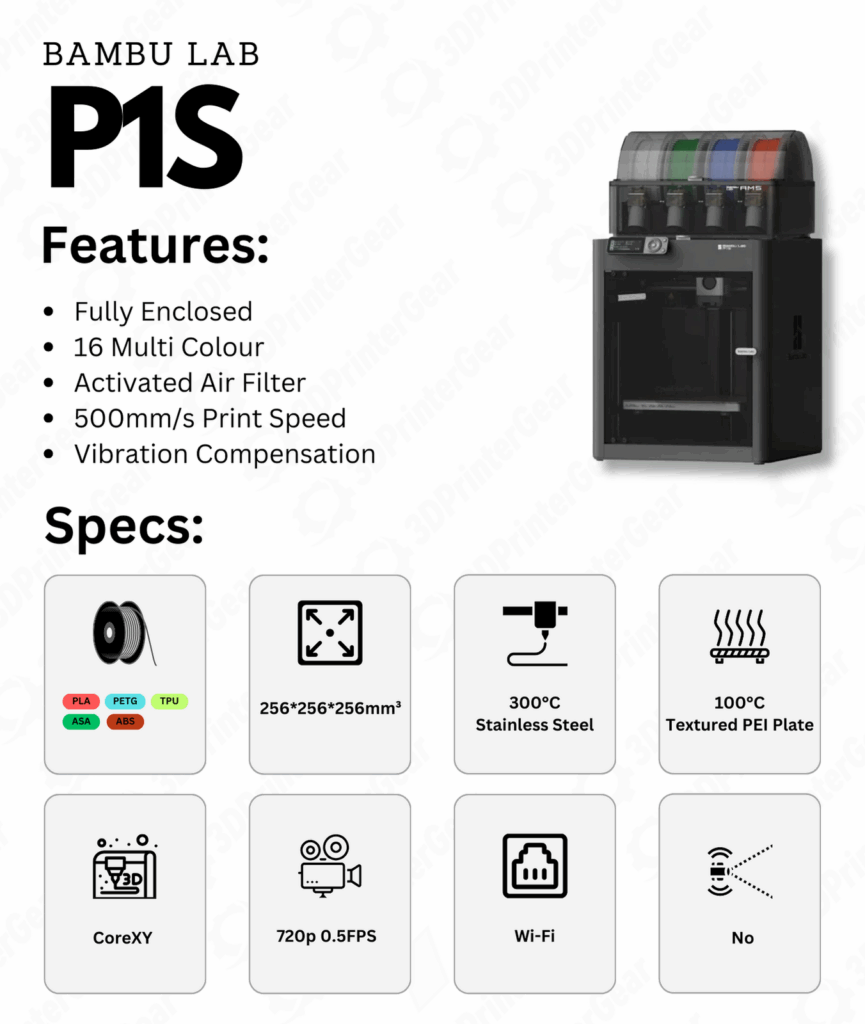
This makes it suitable for ABS, ASA, and other temperature-sensitive plastics, which was a challenge on the open-frame P1P. It also includes a built-in 720p camera for remote monitoring and timelapses (standard on P1S). The toolhead is enhanced with a cable chain for durability, and the P1S has the auxiliary part cooling fan pre-installed (helping with PLA bridging and overhangs, which was optional on P1P). Importantly, the P1S is AMS-ready out of the box – Bambu sells a “P1S Combo” that includes the AMS unit, turning the P1S into a multi-color machine at purchase. With the enclosure and AMS, the P1S becomes a more affordable alternative to the X1 Carbon Combo, with only a few differences remaining (like no LiDAR). In short, the P1S is the “no-compromises” version of the P1 series, aimed at users who want to print fast in all materials, from PLA to ABS, and even multi-color, without stepping up to the pricier X1 series. Tom’s Hardware called it “a new standard for 3D printing” and gave it an Editor’s Choice for its blend of speed, quality, and value.
Limitations: Since the P1S shares its DNA with the P1P and X1, it inherits the closed nature of Bambu’s ecosystem (discussed later). Purely in terms of hardware, the P1S still lacks the X1 Carbon’s LiDAR sensor – so it doesn’t do the automatic first-layer scanning that the X1C does. In practice, this is a minor omission; the P1S’s first layers are generally fine with its calibrated bed leveling (and you can always baby-sit the first layer via the camera). Another subtle difference: the P1S’s default hotend is the same steel nozzle and extruder as P1P (hardened steel hotend is not stock – those are on X1C/X1E). This means if you want to print a lot of carbon-fiber or glass-fiber filaments, you’d need to upgrade the P1S hotend to the hardened version (a simple swap, but an extra ~$50).
Also, while the P1S’s enclosure helps with ABS, it’s a passive heated chamber – it relies on heat from the bed (there’s no active chamber heater on P1S, unlike the pro-level X1E which has one). Even so, the chamber easily stays ~50 °C with ABS prints, which is usually sufficient for warp-free printing of ABS/ASA in this volume. Lastly, the AMS, while awesome for multi-color, introduces some filament wastage (purge towers) – Tom’s noted the AMS “wastes filament” as a con. This applies to any multi-material system but is worth keeping in mind if filament cost or waste bothers you. Overall, the P1S doesn’t have many downsides – it’s widely considered one of the best all-around desktop 3D printers of 2023/2024 for those who value speed and ease of use.
Bambu Lab P1S – Key Specs:
| Specification | Bambu Lab P1S |
|---|---|
| Print Volume | 256 × 256 × 256 mm (same as P1P/X1) |
| Motion System | CoreXY, 500 mm/s max speed, 20k mm/s² accel (fast, precise) |
| Extruder/Nozzle | All-metal direct drive; 0.4 mm steel nozzle (300 °C max, upgradeable to hardened) |
| Enclosure | Yes – fully enclosed with clear panels & front door; passive heated chamber (improves ABS printing) |
| Bed & Chamber | Bed up to 100 °C; Activated Carbon + HEPA filter for fumes (removes VOCs and particles) |
| Cooling | Dual-part cooling fans (closed-loop); Aux fan included; filtered chamber exhaust |
| Camera | Yes – 1280×720 chamber camera, live view & timelapse supported |
| Interface | 2.7″ LCD screen + buttons (same as P1P) for onboard controls |
| Multi-Material | AMS support (up to 4× AMS = 16 colors); P1S Combo includes 1× AMS unit |
| Price (USD) | $699 (base P1S), or ~$949 as “P1S Combo” with AMS (often on sale) |
| Price (INR) | ₹60,999 (P1S printer) / ₹84,999 (Combo with AMS) – via resellers (Robu.in/WOL3D) |
Official Links:
Bambu Lab P1S – Official Store
Robu.in – P1S Listing ・ WOL3D – P1S Listing
P1S User Manual
Competitors: The P1S finds itself compared to both Prusa and Creality flagships. From Prusa, the closest equivalent is a bit unwieldy – possibly the Prusa MK4 with an enclosure and MMU2S for multi-material. However, assembling that setup would far exceed the cost of a P1S and still print much slower. The more apt Prusa competitor might be the upcoming Prusa XL (which will be coreXY and enclosed), but the XL is larger format and starts at $2499 (way above P1S’s price). In essence, Prusa doesn’t have a direct product like P1S at this price; the P1S has carved a niche where you get enclosure + speed + multi-color all together in a mid-range printer. On Creality’s side, the Creality K1 Max is a contender – the K1 Max (~$999) offers a 300 × 300 × 300 mm volume, enclosed frame, and high speed coreXY, aiming at Bambu’s market. It’s larger and has a built-in AI camera, and even a form of multi-material (not as mature as AMS).
If you need the bigger volume and can accept some tuning, the K1 Max is an alternative. Yet, Bambu’s P1S still leads in user experience; it’s refined where the K1 Max may require firmware updates and community fixes to reach its potential. Some users also consider printers like the Voron 2.4 or Trident (DIY coreXY kits) as competitors – those are open-source and high-performance but require extensive building and tuning; a P1S gives similar performance ready-made.
Overall, the P1S stands nearly alone for plug-and-play, high-speed printing in an enclosed desktop machine at ~$700. It’s frequently recommended as the go-to for those with a “bigger than Ender budget” who want a fast, hassle-free 3D printing experience.
Bambu Lab X1 Carbon – Nice Features and AI Assistance
The Bambu Lab X1 Carbon (X1C) is Bambu’s flagship prosumer printer – a feature-packed CoreXY that introduced many of us to “hobbyist 3D printing on easy mode.” It’s named “Carbon” for the carbon-fiber reinforced rods in its motion system and its capability to print carbon-fiber filaments out-of-the-box. The X1 Carbon comes fully assembled and calibrated; it was Bambu’s breakout product (launched via Kickstarter in 2022) that proved 3D printers can be fast, smart, and reliable with minimal user effort.
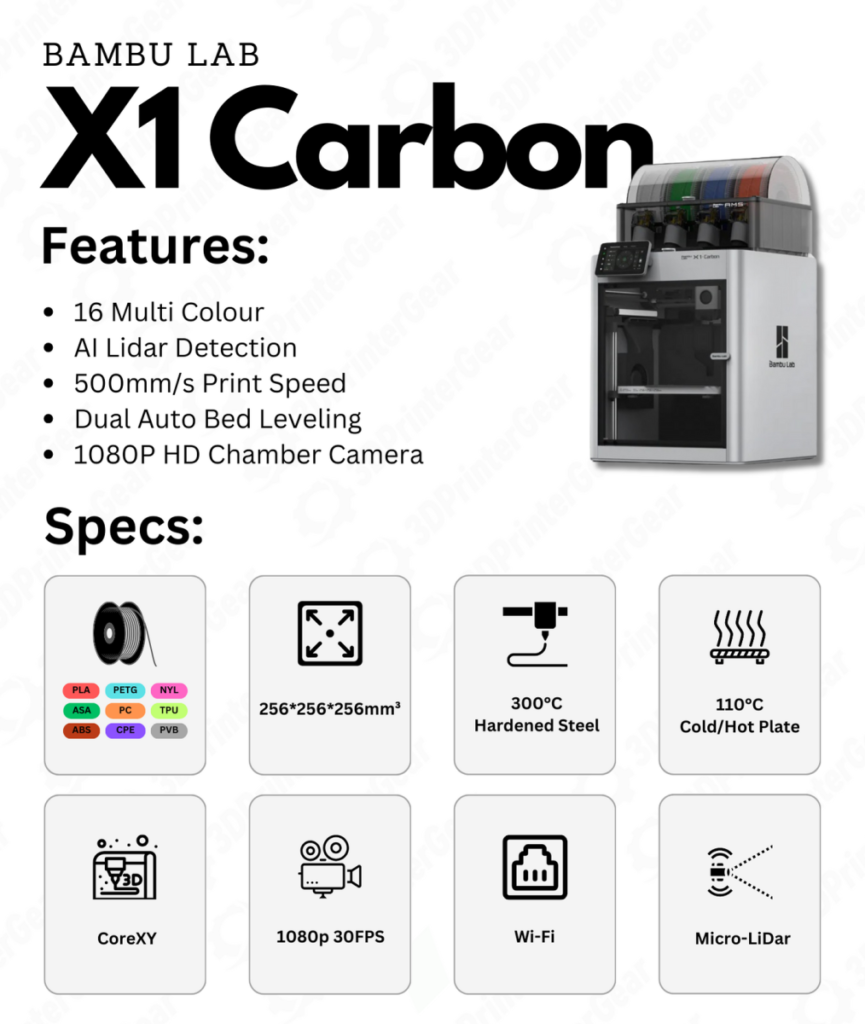
It shares the same 256 mm cube build volume and 500 mm/s speed potential as the P1 series, but adds a suite of sensors and enhancements: a micro LiDAR scanner on the toolhead for auto first-layer analysis and flow calibration, a 1080p AI camera that can detect print failures (like spaghetti detection) mid-print, and an array of ambient sensors (temperature, humidity, etc.). The X1C also has a higher resolution 5″ touchscreen for a modern interface. It is equipped with a hardened steel hotend and hardened dual-gear extruder by default, allowing it to print abrasive materials (carbon fiber nylon, glass fiber fills, etc.) without needing upgrades. The build chamber is fully enclosed in aluminum composite panels and glass, and while it doesn’t have active heating, it retains heat well for engineering materials. The X1 Carbon also includes an auxiliary part cooling fan, chamber fan, HEPA + carbon air filtration, and LED lighting inside – it’s a truly premium setup. In practice, the X1C produces stellar print quality at high speeds, with many safety nets (it will pause if it notices first-layer issues or spaghetti failures, thanks to its AI and LiDAR). All these features led All3DP to call the X1C “a highly refined, technologically advanced 3D printer” that offers one of the best user experiences.
Limitations: The X1 Carbon’s main drawback is its price and closed-source nature. At an MSRP of around $1,199 (or $1,449 for the Combo with AMS), it’s a significant investment for hobbyists. With the AMS, it’s pushing $1500+ – Make: Magazine noted that “on the negative side, it is expensive… pushing $1500 with the AMS”. Additionally, unlike Prusa or Voron, the X1C is closed source – Bambu’s firmware is proprietary (a Linux-based system) and the company has been “not keen” on open-sourcing it. Make: also highlighted this: “it is also closed source, so if you want to support Open-Source initiatives, this will present a quandary”. This means you cannot (currently) install custom firmware like Klipper on the X1C, and certain mods or third-party integrations (e.g., OctoPrint via USB) are not supported. Another limitation is that Bambu’s advanced features like LiDAR and AI rely on their slicer and ecosystem – you have to use Bambu Studio for full functionality (Bambu did release a plugin so you can export generic G-code from PrusaSlicer, etc., but features like first-layer LiDAR scan won’t work outside of Bambu Studio). In terms of printing, some users find the X1C’s super-fast first layer (it often prints the first layer at high speed using LiDAR to correct on the fly) a bit startling – though it usually works, very occasionally the LiDAR can mis-trigger (e.g., with certain glossy beds or transparent filaments). These are rare edge cases; generally the X1C’s AI features greatly increase success rates. Finally, maintenance: with all those features packed in, there’s more that could need servicing (extra fans, sensors). Bambu’s support and community have been robust, but it’s worth noting this isn’t the simple, all-mechanical device that an Ender 3 is – it’s more like a smart appliance, and if something like the LiDAR or camera fails, you’d get replacement parts from Bambu Lab. Overall, for most, the X1C’s pros far outweigh these cons, but it’s important to know that you’re buying into Bambu’s way of doing things with this machine (more on that in the Open-Source section).
Bambu Lab X1 Carbon (X1C) – Key Specs:
| Specification | Bambu Lab X1 Carbon |
|---|---|
| Build Volume | 256 × 256 × 256 mm (enclosed) |
| Frame & Body | Sturdy aluminum alloy frame; enclosed chamber (passive heated) with aluminum/glass panels |
| Extruder & Hotend | Hardened dual-gear extruder; 0.4 mm hardened steel nozzle (hardened 0.6 mm included in combo) – max 300 °C |
| Heated Bed | Flexible PEI plate (textured & smooth sides); up to 120 °C bed temp – supports high-temp plastics |
| Motion & Speed | CoreXY with carbon fiber rods; up to 500 mm/s, 20,000 mm/s² – high precision (repeatability ~7 µm) |
| Sensors & AI | LiDAR for first layer & flow calibration; 1080p AI camera for failure detection (spaghetti, etc.); filament runout & tangling sensors; bed pressure sensor (for leveling) |
| Cooling & Filters | Dual part-cooling (with auxiliary fan) – closed-loop control; chamber fan; HEPA + activated carbon filter for VOC/particle filtration |
| Interface | 5″ full-color touchscreen (1280×720); Tri-color status LED; Wi-Fi/Ethernet connectivity (Ethernet via add-on adapter on X1C) |
| AMS Support | Yes – X1C Combo includes AMS (4-slot); up to 4 AMS units (16 colors) supported |
| Price (USD) | $1,199 (X1 Carbon); $1,449 (X1 Carbon Combo w/ AMS) – MSRP |
| Price (INR) | ₹1,44,000 – ₹1,80,000 (estimated in India, often sold via resellers; e.g. ~₹1.8 Lakh for X1C Combo on WOL3D) |
Official Links:
Bambu Lab X1 Series – Official
Bambu Lab X1C – Store Listing ・ WOL3D – X1 Carbon Combo
X1C User Manual (Official Wiki)
Competitors: The X1 Carbon’s performance and price put it up against the best from Prusa, Creality, and others. Prusa’s XL is often mentioned – the XL (still in limited release in 2024) is coreXY, offers multi-toolhead possibilities, and is aimed at professionals like the X1E (we’ll get to X1E next). A single-tool Prusa XL (with comparable volume ~ 36×36×36 cm) starts at $2499 – much higher cost, but it’s fully open source and expandable. For a Prusa user deciding between MK4 and X1C: the MK4 (approx $1099 assembled) is slower and not enclosed, but open-source; the X1C is faster, enclosed, multi-color capable (with AMS), but closed-source. Prusa’s ethos vs Bambu’s tech is a personal choice – as one Prusa forum user put it, there are “advantages and disadvantages for both open and closed source products”. On the Creality side, the Creality K1 Max (mentioned earlier) is a closer spec competitor to X1C: coreXY, enclosed, similar build volume (300 mm cube), with AI camera, etc., around $999. However, the X1C still outmatches it on some fronts: for example, the K1 Max doesn’t have LiDAR or equivalent first-layer scanning, and its build quality/sensors are a step down (Creality doesn’t have filament odometry or as refined input shaping yet). Another competitor is Anchormake M5 (with enclosure add-on) or Elegoo Neptune 4 Pro, but again, those don’t quite reach the automation and polish of X1C. In the professional segment, printers like Ultimaker S3/S5 could be considered – Ultimaker S5 is ~$6000, dual extrusion, and very reliable, but the X1C at ~$1200-$1500 with AMS can do multi-color too (just via sequential toolchanging in AMS). We also have Voron DIY kits: a Voron 2.4 can match or beat the X1C in speed and is fully open-source, but it’s a significant project to build and tune one; the X1C is ready-to-go.
The X1 Carbon bridges consumer and professional needs. It’s in a class of its own for a turnkey machine – as long as you’re okay with closed firmware, it’s hard to find another printer that offers its combination of speed, multi-material printing, and smart automation at this price point.
Bambu Lab X1E – Enterprise-Level Precision and Control
At the top of Bambu’s lineup is the Bambu Lab X1E, where “E” stands for Enterprise (or Engineering). The X1E is an enhanced version of the X1 Carbon designed for professionals who demand greater material capability, network security, and reliability in office or lab environments. Physically, the X1E looks similar to the X1C, but it introduces a few key upgrades: active chamber heating up to 60 °C, a higher max nozzle temperature of 320 °C, and extensive network control features.
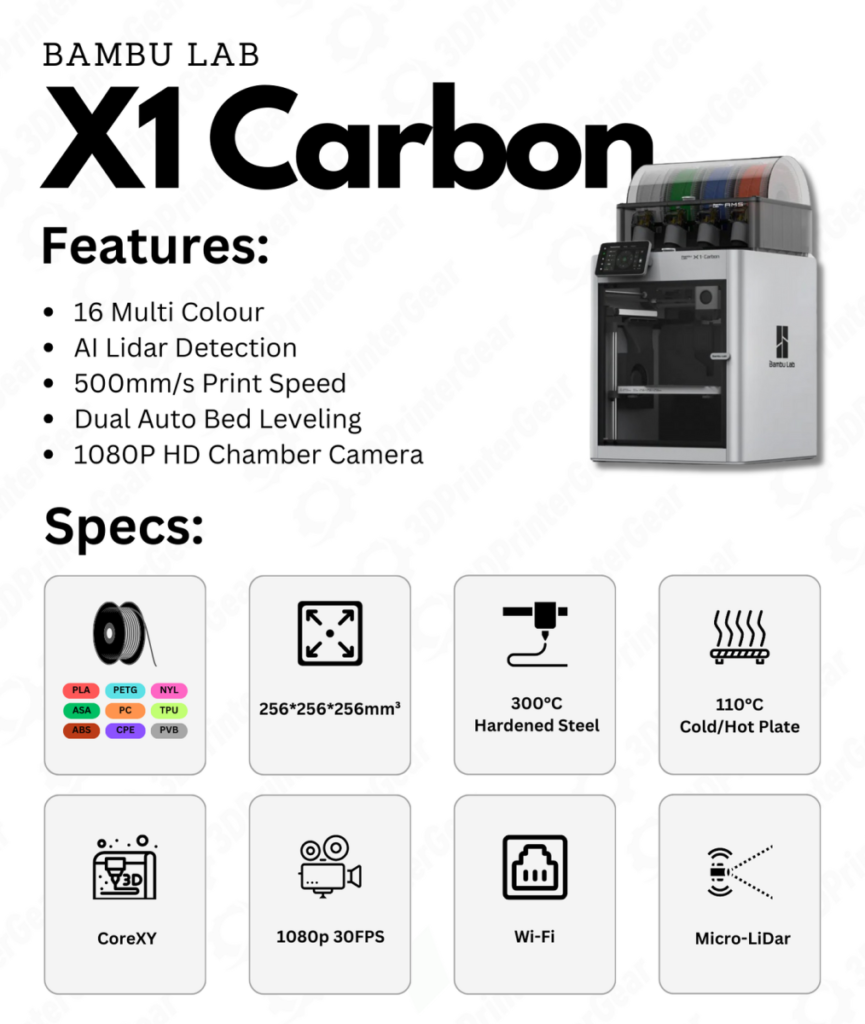
The built-in chamber heater allows the X1E to maintain a 60 °C ambient temperature in the build chamber, which dramatically improves print quality for high-performance materials like PC, nylon, and carbon-fiber composites (reducing warping and improving layer adhesion). The hotend is upgraded to handle up to 320 °C, meaning the X1E can print PPS, PEEK (in some cases), PEI/Ultem blends, and other super polymers that the X1C (300 °C max) might just border on. It ships with a hardened steel 0.4 mm nozzle, and can use exotic filaments including fiber-filled materials extensively. Bambu also fitted the X1E with a “heavy-duty” filtration system – it has a pre-filter + bigger HEPA + larger activated carbon filter (coconut shell carbon) than the X1C’s, optimized for lots of ABS/nylon use.
On the software side, X1E offers LAN-only mode with enhanced security: it has an Ethernet port built-in, supports WPA2-Enterprise WiFi networks, and crucially, has physical kill switches to disable WiFi/Bluetooth for high-security environments. This is aimed at businesses or government labs where IoT devices need to be tightly controlled – you can run the X1E entirely off-line on your local network, something that was a bit of a pain point on earlier models (we’ll address this shortly).
In terms of speed and mechanics, the X1E retains the 500 mm/s high-speed CoreXY with all the trimmings (LiDAR, AI camera, etc.). It’s essentially an X1 Carbon on steroids for engineering use. Priced around $2,499 (before tax) for the base unit (and about $2,899 with an AMS included), the X1E is sold through authorized resellers rather than directly online, signalling its market is more commercial.
Limitations: The X1E is expensive – roughly double the price of the X1C. For many individuals, the extras might not justify the cost, as much of the print quality and speed is the same between X1C and X1E. In fact, some early community discussions questioned “why is the X1E so expensive?”, noting that at first glance it didn’t seem dramatically different from X1C aside from the heated chamber and networking. The answer lies in those details: the heated chamber and enterprise features add cost, and Bambu likely anticipates lower volume sales for X1E (hence higher price). If you don’t need to print a lot of nylon or PEEK, or don’t require LAN-only operation, the X1C is far more cost-effective. Another consideration: while Bambu did add an offline firmware update method for X1E (due to customer feedback), initially even the X1E had some cloud-dependency that frustrated users expecting a fully offline machine. For instance, in LAN mode the X1E (and X1C) cannot do firmware updates or access the SD card via Studio, etc. – Bambu support admitted “none of these functions will be enabled in LAN mode” and firmware updates would still need internet (though one can manually update via SD card now). This is a firmware issue that may improve, but it’s something enterprise users noted as a contradiction between marketing vs reality of “fully functional offline”. Essentially, if you truly require a fully offline 3D printer with zero cloud, the X1E still has some caveats (more on firmware in next section). Lastly, the X1E’s AMS is the same as X1C’s – which is fine, but if you are printing high-temp materials, note that the AMS is not heated and must sit outside the chamber. For certain filaments like ABS, you might want to keep spools dry and warm; the X1E doesn’t address that (no drybox aside from basic AMS). Summing up, the X1E is a specialized tool – fantastic for professional use cases, but likely overkill for a typical hobbyist.
Bambu Lab X1E – Key Specs:
| Specification | Bambu Lab X1E |
|---|---|
| Build Volume | 256 × 256 × 256 mm (same geometry as X1C) |
| Nozzle & Hotend | 0.4 mm hardened steel nozzle (incl.); All-metal hotend to 320 °C max (supports very high-temp materials) |
| Heated Chamber | Yes – Active chamber heating up to 60 °C (for warp-prone plastics) |
| Filtration | Enhanced multi-stage filter: G3 pre-filter + H12 HEPA + large activated carbon (optimized for ABS/nylon fumes) |
| Sensors/Features | Same as X1C: LiDAR first-layer scanner, AI camera, filament sensors, etc., plus Ethernet port, WPA2-Enterprise WiFi, physical network kill switches |
| Extruder/Motion | CoreXY, 500 mm/s, 20k mm/s² (no speed reduction vs X1C) – carbon fiber rods, active vibration & flow control |
| Supported Materials | Virtually everything: PLA, PETG, TPU, ABS, ASA, PC, Nylon, Polycarbonate, PA-CF/GF, PET-CF, PPS, PPS-CF/GF, etc.. (X1E is tuned for high-temp and fiber-filled materials) |
| AMS Multi-Color | Supported (included in $2899 bundle). Up to 16 colors with 4 AMS units like X1C |
| Price (USD) | $2,499 (base, no AMS) / $2,899 (with AMS Lite or AMS 1.0) |
| Price (INR) | ₹2,50,000+ (estimated with taxes/import, via authorized resellers on request) |
Official Links:
Bambu Lab X1E – Official Info
MatterHackers – X1E page
X1E User Manual
Competitors: The X1E competes with commercial-grade FFF printers. Prusa XL with multi-tool heads could be one (a 2-tool XL with enclosure can surpass $3500). There are also brands like Raise3D Pro3 (around $5000) or Ultimaker S5 ($6k) which offer heated chambers or material handling – but the X1E, at ~$2.5k, undercuts many of them on price while offering comparable performance for prototypes. The Creality ecosystem doesn’t really have an equivalent to X1E at the moment – their focus has been more on speed for consumers rather than engineering materials with network security. One could consider something like the CreatBot PEEK-300 or Intamsys FUNMAT for high-temp printing, but those are $5k+ professional machines.
In essence, Bambu created the X1E to fill the gap between prosumer and true industrial printers. If you need a printer for a corporate lab where every aspect (from network to materials) must meet certain standards, the X1E is a turnkey solution that’s still on a desktop scale. It’s worth noting that some advanced hobbyists might choose to build a Voron or VZBot with chamber heaters to achieve similar results, but again, those require a lot of DIY work and don’t come with things like LiDAR or an AI system. The X1E is unique in giving a largely automated, monitored, and secure printing experience at this level. As a user in Bambu’s forum aptly put, comparing X1E to X1C is not apples to apples – “these are two very different products with very different target audiences”. The X1E is for the professional who might otherwise buy a Stratasys or Ultimaker, whereas the X1C covers prosumers and advanced hobbyists.
Continued on Page 2.