
In 2015, the introduction of the Raspberry Pi Zero for a mere $5 heralded a golden age of accessible computing. It promised a future where compute power was disposable, ubiquitous, and essentially free. Makers, students, and engineers could deploy sensors, build ad-blockers, and experiment with Linux without a second thought regarding cost. However, as we stand in 2025, that promise has been eroded by a confluence of supply chain disruptions, inflationary pressures, and the voracious appetite of the artificial intelligence sector for semiconductor memory.
The era of the “cheap Single Board Computer (SBC)” is, for all intents and purposes, dead.
Sometimes, the most efficient, cost-effective, and ecologically sound server hardware available is not a new PCB from a distributor, but the mid-range Android server gathering dust in a drawer. The analysis that follows will dismantle the long-held misconception that “real” servers require GPIO pins and native Ethernet ports. Through a rigorous examination of silicon architecture, economic factors, and software ecosystems, this post provides a roadmap to repurposing mobile hardware from the last decade (2015-2025) into high-performance infrastructure.
Table of Contents
The Economic Reality: The “Starter Kit” Fallacy
To understand the gravy of the situation, one must look beyond the sticker price of the board itself. The recommended retail price of a Raspberry Pi 5 (8GB) might sit around $80, but this figure is deceptive.
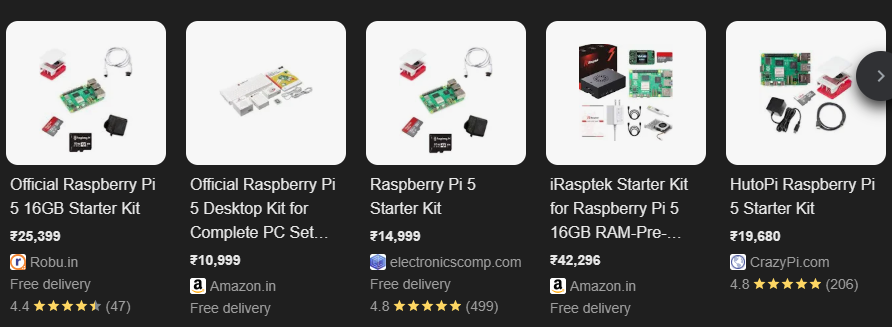
In the Indian market, which serves as a prime example of high-import-duty environments, the cost of a functional Raspberry Pi 5 setup has skyrocketed. A “Complete Starter Kit, which typically includes the board, the mandatory active cooler (a necessity given the thermal density of the BCM2712), a protective case, a reliable 27W USB-C PD power supply to prevent brownouts, and a high-end micro-SD card to mitigate I/O bottlenecks commands a price between ₹19,680 and ₹22,000. This price point places the humble SBC in direct competition with used enterprise-grade mini-PCs and entry-level laptops, devices that include storage, power delivery, and chassis as standard.
Contrast this with the “Zero Cost” alternative. The secondary market for Android smartphones is flooded with depreciated hardware. Devices like the Redmi Note 7 Pro or the Samsung Galaxy A52s, once the darlings of the mid-range market, are now available for ₹3,500 to ₹8,000 ($40-$95) or are frequently available for free within one’s own household or social circle. These devices are not merely “comparable” to an SBC; as the benchmark analysis below will demonstrate, they often vastly outperform them while including critical peripherals that would cost an additional $50-$100 to add to a Raspberry Pi.
Old Android Phone Server vs. Raspberry Pi: The Benchmarks
The analysis focuses on three distinct tiers of mobile hardware representing the “drawer debris” of the average household, compared against the industry-standard Raspberry Pi 4, Raspberry Pi 5, and a common x86 homelab micro-PC (Intel Core i5-7500T).
- The Legacy Hero (2016-2017): Qualcomm Snapdragon 625. Found in legendary devices like the Redmi Note 4 and Moto G5 Plus. It features 8x Cortex-A53 cores built on a 14nm FinFET process. It is renowned for its thermal efficiency.
- The Mid-Range Workhorse (2018-2019): Qualcomm Snapdragon 660/675. The Redmi Note 7 Pro era. This marked the introduction of “Big” cores (Kryo 260/460 based on Cortex-A73/A76) into the mid-range, bringing a massive leap in Instructions Per Clock (IPC).
- The Modern Titan (2021-2023): Qualcomm Snapdragon 778G / 7+ Gen 2. Found in the Samsung Galaxy A52s, iQOO Z5, and Poco F5. These chips bring desktop-class architecture (Cortex-A78 and Cortex-X2) to the phone form factor.
Performance Metrics: Geekbench 6 Multi-Core
Geekbench 6 Multi-Core
Tap a device to compare performance*Note: Snapdragon 625 scores are interpolated from Geekbench 4/5 baselines as direct GB6 data is scarce for legacy hardware. Historical data suggests the SD625 consistently outperformed the RPi 3B+ and rivals the RPi 4 in highly threaded integers tasks due to core count.
Insight 1: The Obsolescence of the Raspberry Pi 4
Above benchmark presents a stark reality for the Raspberry Pi 4. With a score of ~686, it is decisively beaten by the Snapdragon 625, a chip released in 2016. The Cortex-A72 cores in the Pi 4 are architectural dinosaurs compared to even the “little” cores in modern phones. The Snapdragon 660, found in devices available on the Indian used market for ₹3,500 ($40), doubles the performance of the Pi 4. Purchasing a Pi 4 in 2025 for server duties is paying a premium for nostalgia rather than performance.
Insight 2: The Mid-Range Sweet Spot (SD 778G)
The Snapdragon 778G represents the “Golden Ratio” of price, performance, and thermal efficiency. Found in widely available used phones like the Samsung Galaxy A52s and iQOO Z5, this chip scores ~2805, effectively matching the performance of the Intel Core i5-7500T (3069), a standard CPU for dedicated x86 homelab setups.
- Implication: A discarded phone from 2021 provides the same computational throughput as a dedicated desktop PC from 2017, but consumes a fraction of the energy (approx. 3-5W vs 35W TDP).
- RPi 5 Comparison: The SD 778G outperforms the newly released Raspberry Pi 5 by approximately 43%. While the Pi 5 has faster single-core performance due to high clock speeds, the 778G’s 8-core configuration allows for superior multitasking in containerized environments.
Insight 3: The Cortex-X2 Revolution (SD 7+ Gen 2)
The Poco F5 (Snapdragon 7+ Gen 2) creates a new category. By incorporating a Cortex-X2 “Prime” core, it achieves a score of ~4295, annihilating both the Raspberry Pi 5 (1960) and the Intel i5-7500T (3069).
- Analysis: This is not just a “phone processor.” It is a desktop-class architecture downclocked for mobile thermal envelopes. It delivers more than double the performance of the Raspberry Pi 5. For workloads involving compilation, video transcoding, or AI inference, this device is vastly superior to any SBC on the market under $150.
The “Viability Tier List”: Categorizing Usage by Silicon
Benchmarks tell only part of the story. To successfully repurpose a device, one must match the workload to the silicon’s architectural strengths and limitations. This “Viability Tier List” categorizes common homelab applications against the hardware capabilities of different phone generations.
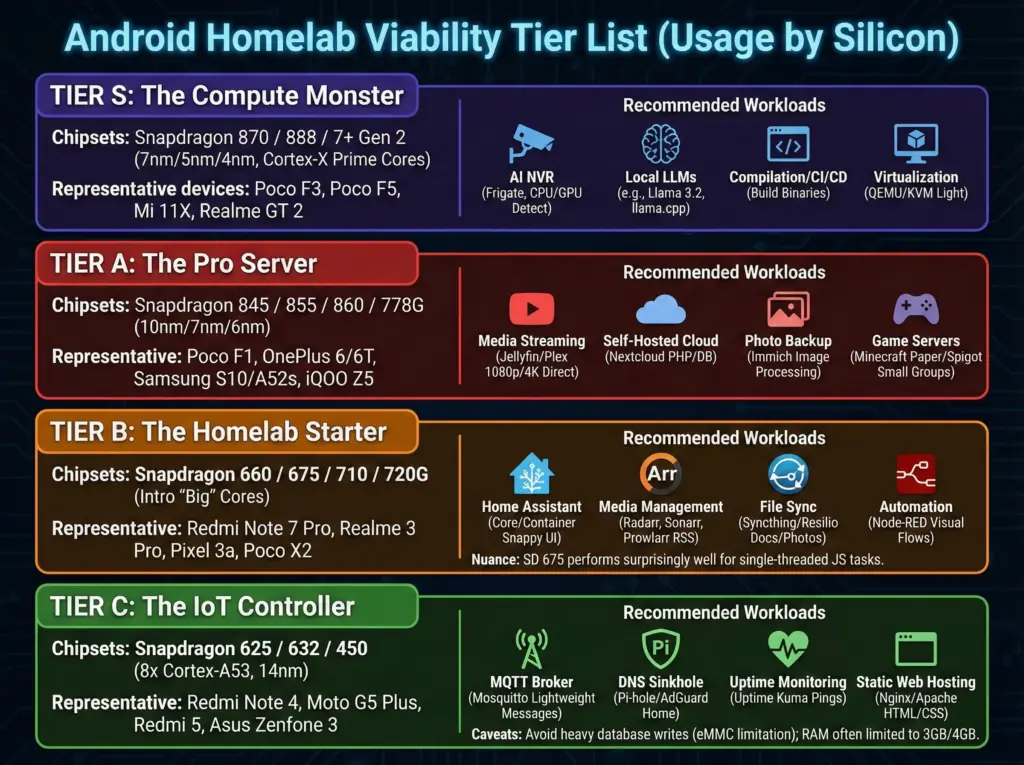
Tier C: The “IoT Controller” (Snapdragon 625 / 632 / 450)
- Representative Devices: Redmi Note 4, Moto G5 Plus, Redmi 5, Asus Zenfone 3.
- Architecture: 8x Cortex-A53 (14nm). Low power, high efficiency.
- Recommended Workloads:
- MQTT Broker (Mosquitto): Perfect for handling thousands of lightweight messages from ESP32/Zigbee sensors.
- DNS Sinkhole (Pi-hole / AdGuard Home): DNS queries are computationally inexpensive. The SD 625 can handle network-wide ad-blocking for a typical household without sweating.
- Uptime Monitoring (Uptime Kuma): A lightweight service to ping other servers.
- Static Web Hosting (Nginx/Apache): Serving HTML/CSS/JS files.
- Caveats: Avoid heavy database writes (MySQL/PostgreSQL) due to eMMC storage often found in lower-end variants. RAM is typically limited to 3GB or 4GB, precluding heavy Java applications.
Tier B: The “Homelab Starter” (Snapdragon 660 / 675 / 710 / 720G)
- Representative Devices: Redmi Note 7 Pro, Realme 3 Pro, Pixel 3a, Poco X2.
- Architecture: Introduction of “Big” cores (Kryo 260/360/460).
Recommended Workloads:
- Home Assistant (Core/Container): Capable of running the full Home Assistant stack with dozens of automations and integrations. The “Big” cores ensure the UI remains snappy.
- Media Management (The Arr Stack): Radarr, Sonarr, Prowlarr. These apps require bursts of CPU for parsing RSS feeds and managing file moves, which the SD 675 handles adeptly.
- File Sync (Syncthing/Resilio): Syncing documents and photos.
- Automation (Node-RED): Visual programming flows run smoothly.
Nuance: The Redmi Note 7 Pro (SD 675) features two Cortex-A76 cores, making it surprisingly potent for single-threaded tasks like JavaScript execution in Node.js
Tier A: The “Pro Server” (Snapdragon 845 / 855 / 860 / 778G)
- Representative Devices: Poco F1, OnePlus 6/6T, Samsung S10 (Snapdragon), Samsung A52s, iQOO Z5.
- Architecture: 10nm/7nm/6nm processes. High sustained performance.
- Recommended Workloads:
- Media Streaming (Jellyfin/Plex): Excellent for Direct Play of 1080p and 4K content. Software transcoding is viable for 720p/1080p streams.
- Self-Hosted Cloud (Nextcloud): Handling PHP processing, database queries, and thumbnail generation.
- Photo Backup (Immich): The CPU is powerful enough to handle image processing, though machine learning features (facial recognition) should be scheduled for off-hours on older 845s.
- Game Servers: Minecraft (Paper/Spigot) for small groups (3-5 players).
Tier S: The “Compute Monster” (Snapdragon 870 / 888 / 7+ Gen 2)
- Representative Devices: Poco F3, Poco F5, Mi 11X, Realme GT 2.
- Architecture: 7nm/5nm/4nm. Cortex-X1/X2 Prime cores.
- Recommended Workloads:
- AI NVR (Frigate): Capable of running object detection using CPU detectors or OpenCL offloading to the GPU.
- Local LLMs: Running quantized Large Language Models (e.g., Llama 3.2 1B or 3B parameters) using
llama.cpp. The SD 7+ Gen 2’s memory bandwidth supports reasonable token generation rates. - Compilation/CI/CD: Building binaries or Docker images directly on the device.
- Virtualization: Running lightweight QEMU/KVM virtual machines (with significant overhead, but possible).
Bottlenecks & Limitations
⚠️ The Bottleneck Inspector
Why your phone isn’t a “Real” server (and how to fix it).USB 2.0 vs 3.0: The Silent Killer
Most mid-range phones (Redmi Note 7-10, Samsung A-Series) have a Type-C port, but electrically it is only USB 2.0. This caps your speed at ~350 Mbps.
Copper vs. Air
Phones are “WiFi First” devices. WiFi adds 2-10ms of jitter. For a stable Home Assistant or Game Server, you need a USB-OTG Ethernet adapter.
The Driver Lottery
Not all adapters work. Android kernels lack the vast driver library of desktop Linux.
The Passive Dissipation Wall
Phones are designed for “burst” speed, not sustained server loads. A Snapdragon 888 will throttle within minutes of compiling code.
ACC (Advanced Charging Controller) to cap charge at 60%.
The Engineer’s Fixes
Advanced Capabilities: The Forbidden Fruit
If one can navigate the limitations, the rewards are substantial. The specialized silicon inside a smartphone offers capabilities that Raspberry Pis can only dream of.
Hardware Transcoding (Jellyfin)
The Raspberry Pi 4 struggles mightily with video transcoding. The Pi 5 is better but lacks dedicated hardware encode/decode blocks accessible easily in Linux. Qualcomm Snapdragons contain powerful Adreno GPUs and VPUs (Video Processing Units).
- The Challenge: Accessing the Adreno GPU from inside a Proot (Debian) container is complex because the container cannot “see” the Android hardware drivers directly.
- The Solution (VirGL / Zink / Turnip): The Termux community has made massive strides here. Using Termux-X11 and Mesa Zink (OpenGL over Vulkan) drivers, it is now possible to map 3D acceleration into the Linux environment.
- Transcoding Strategy: For Jellyfin, the most performant path is currently not running it inside the Proot container, but running the native Android server application if available, or compiling
ffmpegwithin Termux with OpenCL support enabled for the Adreno GPU. This unlocks hardware-accelerated transcoding that outperforms the software rendering of the Pi 5.
AI Inference: The NPU Advantage (Frigate / LLMs)
Frigate NVR typically requires a Google Coral TPU ($60+) to perform object detection without consuming 100% of the CPU. Snapdragon chips include a Hexagon DSP/NPU (Digital Signal Processor / Neural Processing Unit) designed specifically for this math.
- The Frontier: Accessing the Hexagon NPU from standard Linux libraries (TensorFlow Lite, OpenVINO) inside Termux is the current bleeding edge of research. While Qualcomm provides the SNPE SDK for Android apps, bridging this to a Docker container is difficult.
- The Workaround:
- CPU Brute Force: The Cortex-X2 in the Poco F5 is so powerful that it can run object detection for 2-3 cameras purely on the CPU without bogging down, something impossible on a Pi 4.
- OpenCL: Using OpenCL delegates on the Adreno GPU allows for AI acceleration that, while not as efficient as the NPU, is significantly faster than the CPU.
- Local LLMs: Projects like
llama.cpphave added support for ARM NEON and even experimental NPU support for Snapdragons. A Poco F5 can run a quantized Llama 3 8B model at readable speeds, turning the phone into a private, offline AI assistant.
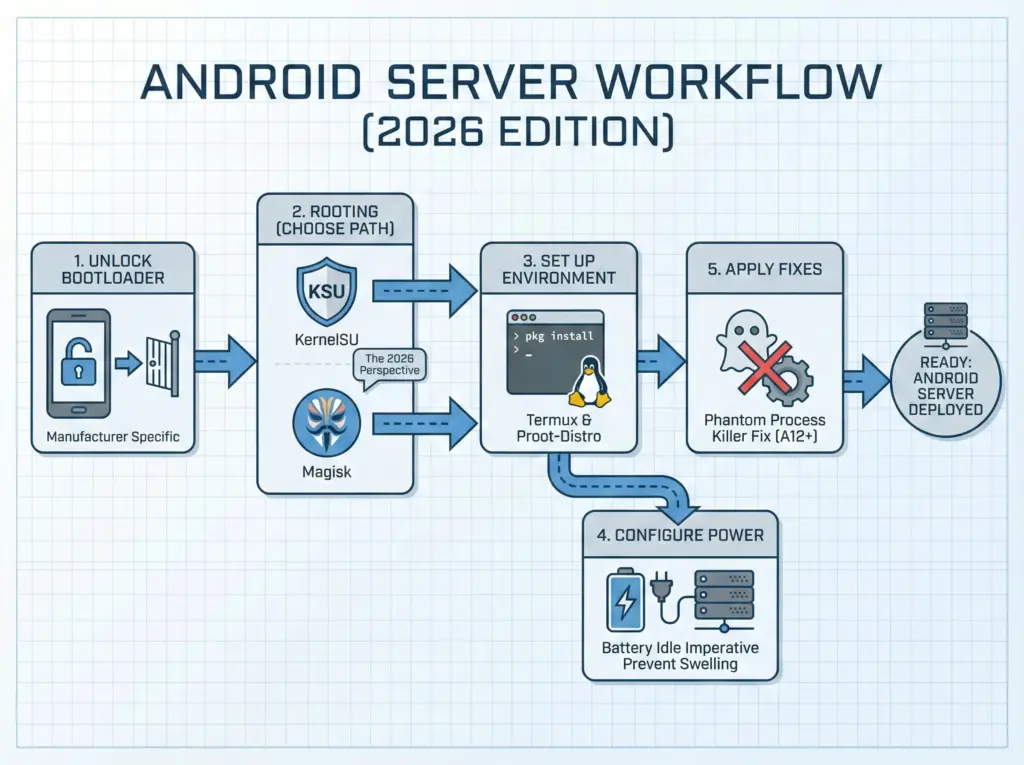
How to Build Your Android Server: The Step-by-Step Guide