
If you are anything like me, your home lab, gaming setup, or 3D printing station is a chaotic tangle of power bricks, extension cords, and mystery cables. You plug things in, hope the breaker doesn’t trip, and have absolutely no idea how much power that old server or that idle 3D printer is actually drawing.
Commercial “Smart” PDUs (Power Distribution Units) from brands like APC or Eaton are fantastic, but they cost hundreds, sometimes thousands of dollars. Cheap Wi-Fi smart plugs are okay for a single lamp, but trying to manage eight of them behind a rack is a nightmare of connectivity issues and unreliable apps.
Table of Contents
Today, we are documenting the complete journey of building the Ultimate DIY 8-Channel Smart PDU. This isn’t just a power strip with Wi-Fi. This is a professional-grade power management system built around the mighty ESP32 and the flexibility of ESPHome.
ESP32 8CH PDU Capabilities
8 Controllable Channels
Toggle your PC, printer, lights, and servers independently via Home Assistant with absolute precision.
Real-Time Monitoring
Get accurate, live telemetry for RMS Voltage, Total Current draw, and Active Power usage.
Energy Tracking
Daily kWh accumulation logging allows you to calculate exactly what your setup costs to run over time.
Reactive RGB Status
Addressable WS2812b LEDs provide instant visual feedback: Rainbow for idle, Scan for active, Strobe for overload.
OLED Dashboard
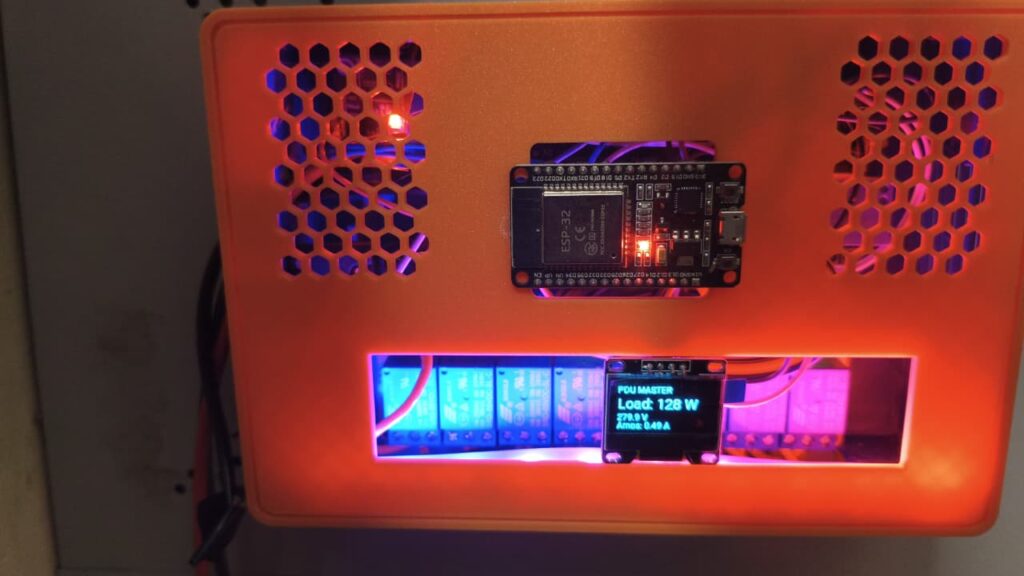
Integrated 1.3″ display provides critical stats like IP address, real-time voltage, and total load at a glance.
Smart Web Calibration
Tune voltage and current sensors directly from the browser using a known load. No re-flashing code required.
Rock-Solid Safety
Engineered with ‘Normally Open’ relay logic for fail-safe power cut-off and conservative load limits.
Edge Automation Engine
Logic runs locally on the ESP32 chip. Safety checks and reactive animations work even if Wi-Fi goes down.
Seamless Maintenance
Instant native API integration with Home Assistant and robust Over-The-Air (OTA) wireless updates.
The “Why” and The Architecture
Before we melt solder, we need a plan. The goal was to create a central power hub that could handle a significant load—think a gaming PC (RTX 3050/i9), a Bambu Lab P1S 3D printer (high initial heatbed draw), a home lab server, and networking gear—all simultaneously.
We needed a brain with plenty of GPIO pins, robust Wi-Fi, and enough processing power to handle analog sensor calculations in real-time. The ESP32 DevKit V1 was the obvious choice.
For software, proprietary cloud apps were out of the question. We chose ESPHome because it allows us to define the hardware behavior entirely in YAML, processes everything locally on the chip, and integrates natively with Home Assistant instantly. It also gives us the power to perform complex math, filtering, and automations right at the edge.
Bill of Materials
Brains & Sensors
-
1xESP32 DevKit V1 30-pin or 38-pin microcontroller core.
-
1x8-Channel Relay Module 5V, “Low Level Trigger” logic is crucial.
-
1xZMPT101B Voltage Sensor Precision micro-voltage transformer.
-
1xWCS1700 Current Sensor Hall Effect, high amperage rating.
-
1xHi-Link HLK-PM01 Isolated 5V AC-to-DC buck converter.
-
1xWS2812b LED Strip 10 LEDs for visual status feedback.
-
1x1.3″ I2C OLED Display SH1106 or SSD1306 driver.
Mains Hardware
-
8xPanel Mount AC Sockets C13 or regional standard type.
-
1xC14 Fused Power Inlet With integrated Rocker Switch.
-
1xThermal Circuit Breaker 15A recommended for safety.
-
14 AWG Copper Wire 2.5mm² stranded for main AC paths.
-
Ferrules & Crimping Tool Mandatory for safe screw terminal connections.
Enclosure & Build
-
PETG Filament Required for heat resistance. PLA is unsafe near mains components.
-
18-22 AWG Wire For internal DC signal wiring.
Hardware Deep Dive & Connections
This project bridges the gap between low-voltage logic (3.3V/5V) and lethal mains voltage (110V/230V). Extreme caution is required.
The Golden Rule of Relays: Normally Open (NO) vs. Normally Closed (NC)
For a PDU, the configuration is non-negotiable: Use Normally Open (NO).
The relay has three output terminals: COM (Common), NO (Normally Open), and NC (Normally Closed).
- NO: The connection is broken by default. Power only flows when the ESP32 actively energizes the relay.
- NC: The connection is made by default. Power flows until the ESP32 turns the relay off.
Why NO? Safety. If your ESP32 crashes, its power supply dies, or a wire breaks, a Normally Open relay “relaxes” and cuts power to the socket. Your 3D printer heater turns off. If you used NC, a failure would leave the heater ON indefinitely, creating a massive fire hazard.
Wiring the Socket:
- Live Wire from Breaker -> Relay COM terminal.
- Relay NO terminal -> Live pin on the AC Socket.
The Sensor Challenge
This was the hardest part of the hardware build. Measuring AC is not straightforward.
1. Voltage Sensing (ZMPT101B) This module uses a tiny transformer to step down 230V AC to a safe, tiny AC wave (e.g., +/- 1V). It is powered by 5V and biases the output signal to center around 2.5V DC so the ESP32 can read the full negative and positive swing of the AC wave without damaging its analog pins.
Crucial Hardware Adjustment: The blue potentiometer on the module controls the “Gain” (the size of the output wave). During our build, we realized the signal was clipping (hitting the 3.3V ceiling of the ESP32). We had to turn the screw counter-clockwise to reduce the gain until the wave fit comfortably within the ESP32’s readable range (ideally swinging between 1.0V and 3.0V).
2. Current Sensing (WCS1700) – The “5V Trap” The WCS1700 is a Hall Effect sensor. It measures the magnetic field generated by current passing through its hole.
We encountered a major hurdle here. Initially, we powered the sensor with 3.3V from the ESP32. The readings were garbage—mostly zero, even with a load.
- The Diagnosis: The WCS1700 is designed for 5V operation. At 5V, its sensitivity is roughly 32mV/Amp. At 3.3V, sensitivity drops drastically, making small loads (under 200W) indistinguishable from background noise.
- The Fix: We moved the WCS1700’s VCC pin to the ESP32’s VIN (5V) pin. The sensor immediately woke up, its resting voltage stabilized at ~2.5V, and it began detecting loads accurately.
The 3D Printed Enclosure
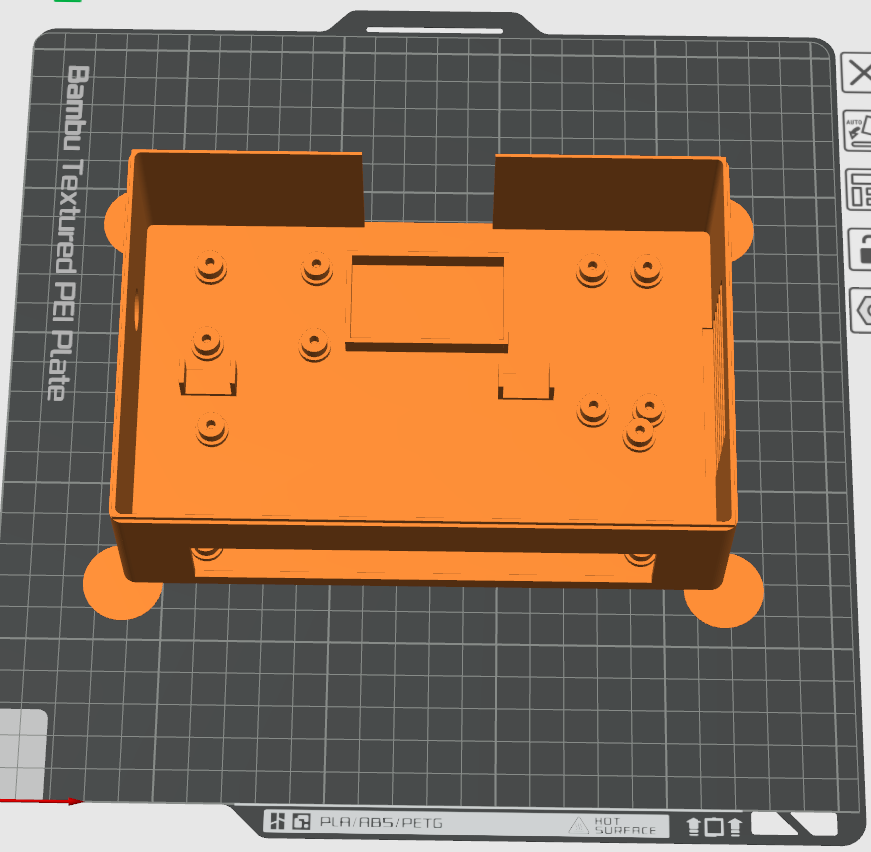
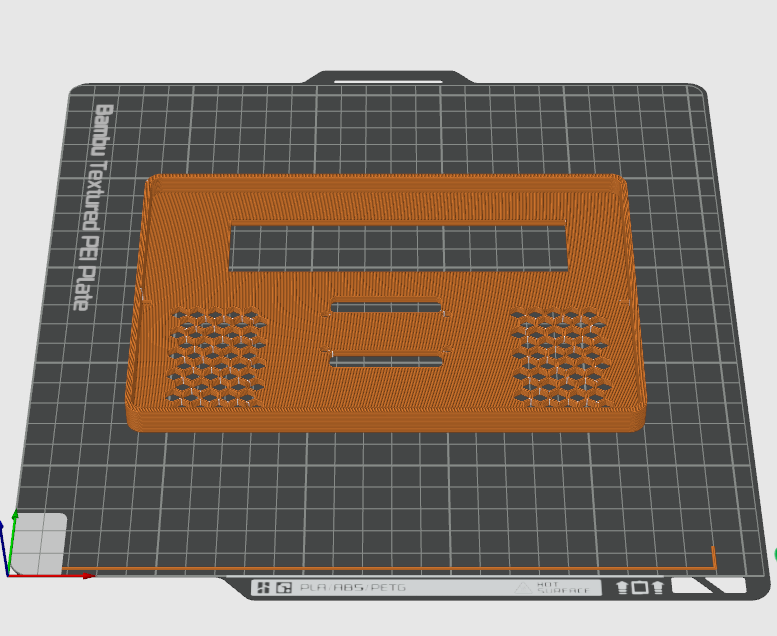
A project like this needs a safe home. We designed a custom, modular enclosure using Fusion 360, specifically optimized for FDM 3D printing.
Design Key Features:
- HV/LV Segregation: A physical printed barrier separates the high-voltage mains wiring area from the delicate ESP32 and sensor electronics.
- Airflow: Generous vents are placed near the Hi-Link power supply and along the relay bank to allow passive convection cooling.
- Mounting Bosses: Dedicated spots for the ESP32, relay board, and sensors to prevent shorts caused by loose components.
- Strain Relief: A robust clamp at the C14 inlet ensures that tugging on the power cord doesn’t rip internal wiring loose.
- Material: Printed in PETG for its higher temperature resistance compared to PLA. A relay running near its limit can get warm; we don’t want the case deforming.
The Soul of the Machine: ESPHome Configuration
This is where the magic happens. ESPHome allows us to turn raw, noisy sensor data into accurate, smooth readings and define complex behaviors.
The Full Configuration Checklist
We won’t paste the entire 300-line YAML file here (it’s available on our GitHub repository), but we will break down the critical sections that make this PDU “smart.”
1. Globals and Web UI Calibration (The “Killer Feature”)
We hated the idea of re-compiling and uploading code just to tweak a calibration number. We built a system that lets you calibrate directly from the device’s web page.
We define global variables (globals:) with restore_value: yes. This tells the ESP32 to save these numbers to its permanent flash memory so they survive reboots.
globals:
  - id: voltage_calib_factor
    type: float
    restore_value: yes
    initial_value: '4450.0' # A starting guess based on our hardware
  - id: current_calib_factor
    type: float
    restore_value: yes
    initial_value: '31.25'  # Based on WCS1700 spec (1V / 0.032V/A)
We then created input boxes (number: component) in the Web UI where the user types the actual measured voltage or the known wattage of a load. A button: component runs a lambda script to calculate the new factor instantly:
// Simplified lambda logic for current calibration
float real_amps = id(calib_target_watts).state / id(pdu_voltage).state;
float raw_reading = id(pdu_current_raw).state;
float new_factor = real_amps / raw_reading;
id(current_calib_factor) = new_factor; // Update global variable
ESP_LOGI("calib", "New Factor Saved: %.4f", new_factor);
2. Sensor Signal Processing (Filtering the Noise)
Raw analog signals from sensors are noisy and jumpy. If you pipe raw data into Home Assistant, your history graphs look like a seismograph during an earthquake. We used advanced ESPHome filters to smooth this out.
Voltage Smoothing: We used an exponential_moving_average filter. This is smarter than a simple average. It reacts quickly to significant changes (like a brownout) but aggressively smooths out tiny jitters.
filters:
      # Alpha 0.2 means the new reading only affects the average by 20%.
      # Great for smoothing jitter while remaining responsive.
      - exponential_moving_average:
          alpha: 0.2
          send_every: 1
      # Only report to HA if voltage changes by at least 0.5V to save database space.
      - or:
          - throttle: 60s
          - delta: 0.5
Current “Ghost busting”: Hall effect sensors pick up magnetic noise from nearby relays and Wi-Fi bursts, often showing 0.05A or 0.1A even when nothing is plugged in. We implemented a “noise gate” in the lambda function:
// If the calculated current is less than 0.10 Amps, force it to zero.
if (val < 0.10) return 0.0;
return val;
Note: During calibration with small loads, we temporarily disable this filter to see the raw data
3. Reactive LED Status
The WS2812b strip isn’t just for looks; it’s a quick status monitor. We used the esp32_rmt_led_strip platform for flicker-free operation.
An interval automation checks the PDU status every 2 seconds and applies effects:
- Idle (All Relays OFF): A dim, slow “Rainbow Flow.”
- Active (Any Relay ON): A bright green “Cylon” scanner effect (Battlestar Galactica style).
- Overload Alarm (>2500W Total): A violent Red/Blue police strobe effect. You can’t miss it.
The Critical Step: Calibration Guide
You built it. You flashed it. Now you have to teach it what “230 Volts” actually looks like.
Voltage Calibration (ZMPT101B)
- Hardware Tune: Before software, check the physical sensor. Power up the ESP32. Don’t plug into mains yet. Use a multimeter to measure the output pin of the ZMPT101B relative to GND. Adjust the blue screw until it reads exactly 2.5V DC.
- Software Tune: Plug the PDU into mains power.
- Measure Reality: Use a trustworthy multimeter to measure your wall socket voltage carefully (e.g., it reads 236V).
- Web UI: Go to the PDU’s IP address in your browser. Type
236into the “Calibrate: Real Voltage” box. - Click: Press the “Action: Calibrate Voltage” button. The “PDU Voltage” sensor should instantly snap to 236.0V.
Current Calibration (WCS1700)
This requires a significant, known load. A phone charger won’t cut it. We used a 1000W resistive space heater because its power draw is stable.
- Zero Check: With nothing turned on, ensure “PDU Current” reads 0.00A. (If not, your noise gate filter might need adjusting).
- Apply Load: Plug in the heater and turn its relay ON.
- Verify Load: Ideally, measure the heater’s actual amperage with a clamp meter. Alternatively, trust its rated wattage (e.g., 1000W).
- Web UI: Type
1000into the “Calibrate: Known Load (Watts)” box. - Click: Press the “Action: Calibrate Current” button. The ESP32 will take the current voltage, calculate the expected amps for 1000W, compare it to the sensor’s raw signal, and save the perfect calibration factor.
Safety, Best Practices, and Load Limits
We are dealing with mains electricity. Ignorance here causes fires.
- Use Ferrules: Never insert bare stranded wire into a screw terminal. The strands splay out, creating a poor connection that heats up and melts plastic. Always use properly crimped ferrules.
- Wire Gauge: Use 14 AWG (2.5mm²) for the main power spine. Do not use breadboard jumper wires for anything carrying mains current.
- The “Heat Check”: After your first hour of heavy load (like a 3D print), carefully touch the outside of the case near the relays. It should be ambient temperature or barely warm. If it’s hot, something is loose.
- Understanding Limits:
- Per-Socket Limit: While the relays say “10A”, the PCB traces and terminal blocks are the bottleneck. We recommend a safe continuous limit of 1500W (approx 6-7A) per socket for resistive loads, and much less (400W) for inductive loads like motors or pumps due to inrush current spikes.
- Total PDU Limit: This is dictated by your input breaker. We used a 15A breaker, meaning the total combined load of all 8 sockets must never exceed ~3300W (at 220V).